01 / 學習教材一堂課的時間,
一堂課的時間,
建立自己的 AI 工作方法。
按原大綱的順序學習,也可以搜尋你需要的主題。
點開每個段落,查看講解、示範與練習。
共 38 個段落 · 90 分鐘
找不到相符的教材
試試另一個關鍵字,或清除搜尋回到完整課程。
01
由實際需要出發
7 段 · 15 分鐘03選工具之前,先想清楚要解決甚麼先問自己:有甚麼問題?想解決甚麼事?想清楚之後,再去找合適的工具。
05應用在學生:支援理解、練習與反思讓 AI 成為學生學習過程中的支援,讓學生繼續思考、嘗試和表達。
理解:用適合年級的例子說明概念,並請學生用自己的話重述。練習:針對同一目標安排不同支援,而不是只增加題量。回饋:指出答案中的具體證據、錯誤位置和下一步,讓學生知道怎樣改。
解釋與應用:請學生說明原因,或把概念放入新情境;例如辨認課文中的比喻後,再用比喻描述校園一角。反思:請學生比較修改前後的思路,說出哪一個提示幫到了自己,以及下次可以獨立完成甚麼。
使用 AI 輔助時,觀察學生是否仍需要思考與回應。若工具一開始便給出完整答案,可以把規則改為『先問一個問題、每次只提供一個提示、等學生嘗試後再繼續』。
- 理解與練習:目標清楚、支援合適
- 回饋與應用:說明依據、換個情境
- 反思:讓學生說出思考的改變
一起試一試
從五個環節中選一個,你希望今天改善哪一項?
我選回饋:學生需要知道『把 3 乘進括號』在哪一步出錯,以及下一步怎樣修正。
02
認識 AI 的做法
7 段 · 13 分鐘08從2022年的ChatGPT,到今天的AI使用方式從一次問答,到帶着素材、規則和檢查步驟完成一項工作。
2022 年 ChatGPT 推出後,許多人第一次以日常語言和生成式 AI 對話。常見的起步方法是問一條問題、讀一段回答;今天的應用則常結合文字、圖片、檔案及不同工具,逐步完成較完整的工作。
對教師來說,關鍵轉變是把『問 AI』變成『安排一個可檢查的工作過程』:提供材料、說明成功標準、要求列出依據、檢查初稿,再修改一次。即使功能名稱不同,這個過程仍然適用。
- 從單次問答,走向有步驟的工作
- 把材料與判斷標準一起提供
- 初稿之後,安排檢查與修訂
11RAG:先找相關資料,再生成回應讓回答對應指定材料,並保留教師可以追查的依據。
12Workflow、Agent、Harness:三者各做甚麼?先認識分工:工作流程安排步驟,Agent 選擇行動,Harness 提供執行環境與控制。
Workflow 是一連串安排好的工作步驟,例如收集作業、按準則分析、整理回饋、交由教師覆核。當步驟穩定、輸入輸出清楚時,先用固定流程,通常比較容易測試和改善。
Agent 通常指可根據目標與當前結果,選擇下一步行動、使用工具並繼續工作的系統。它可能需要先找資料,再整理結果,再檢查是否完成;能做哪些行動,取決於它被提供的工具與權限。
Harness 可理解為包住模型的運作環境,負責接駁工具、保存工作狀態、處理權限、記錄結果等。各產品對詞語的用法可能有差異。教師只需知道:可靠成果來自目標、流程、工具、控制和檢查共同配合。
- Workflow:安排工作步驟
- Agent:按目標選擇下一步行動
- Harness:提供工具、狀態與控制
14把技術放回教學需要用需要選方法:讓每一個技術名詞,對應一個可觀察的教學目的。
03
建立與使用 Skill
4 段 · 6 分鐘15建立 Skill:名稱、說明與指示三個欄位各有用途:名稱方便識別,說明交代用途,指示保存做法。
建立 Skill 時,先填寫名稱,讓自己和同事容易找到這套方法;再填寫說明,交代它適合處理甚麼任務;最後在指示欄寫清楚需要的輸入、工作步驟、輸出格式和檢查要求。
本站每款 Skill 都提供「名稱、說明、指示」三欄,可分別複製,貼到 Gemini Skill 的對應欄位,再建立 Skill。請保留網站提供的名稱,先完成一次測試,之後才按自己的用途修改。也可以下載獨立 ZIP,使用匯入方式建立同一款 Skill。
Google 官方的功能與推出說明可能隨地區、帳戶及版本更新;上課時請以實際可見介面和下列官方說明為準。
- 名稱:識別這款 Skill
- 說明:甚麼時候、用來做甚麼
- 指示:怎樣做、輸出甚麼、如何檢查
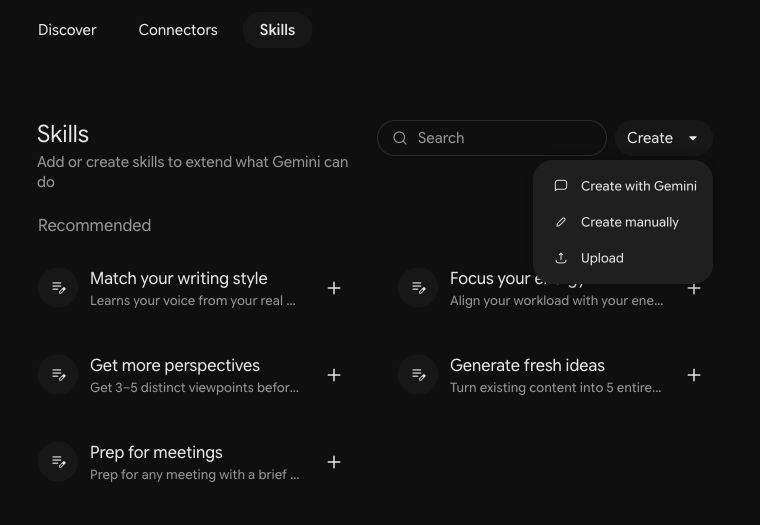
16建立 Skill 的三種方式請 Gemini 協助建立、手動分欄貼上,或上載 ZIP;建立後都要使用樣例測試。
方式 A:從 Customize/自訂進入 Skills,點 Create → Create with Gemini。用日常語言說明你想建立的 Skill 用途、使用對象、會提供的材料及希望得到的輸出,依對話中的引導補充要求。完成後到 Skills 頁面核對產生的內容,再用樣例測試。
例如:「請幫我建立一個備課 Skill。對象是初二學生,我會提供課題、課時和學習目標,請產生包含時間、教師活動、學生行動及檢查理解方法的教案;資料不足時先問我。」這是建立需求的示例,完成後仍要檢查 Skill 的指示是否合用。
方式 B:點 Create → Create manually。在網站所選資源依次複製「名稱、說明、指示」,貼到對應欄位;確認三欄內容後建立 Skill。分欄複製適合先閱讀和調整指示,也方便老師看清每個欄位的用途。
方式 C:下載本網站的獨立 Skill ZIP,從 Skills 點 Upload,選擇 ZIP,檢查匯入內容後建立。圖中的 Upload 在 Create 選單內,部分帳戶直接顯示 Upload,請依自己的畫面操作。
三種方式擇一即可。建立後,選用該 Skill,加入資源頁的測試輸入,再按核對表檢查。若學校帳戶尚未顯示 Skills,先保存資源與測試材料,並按學校規定確認帳戶功能及管理設定;有可用入口後再完成建立和測試。
- AI 協助:Create with Gemini
- 手動:Create manually → 分欄貼上
- 匯入:Upload → 選擇 Skill ZIP
17「指示」欄:把工作方法說清楚用途、輸入、步驟、輸出、檢查:把五部分放入 Skill 的指示欄。
04
先說出你的想法
3 段 · 8 分鐘19練習前:用Typeless把想法說出來先把本次需要說出來,再檢查文字;固定做法已保存在 Skill。
Typeless 可把自然口述整理到文字欄位。選用 Skill 後,只要說出這次的課題、班級情況或新素材;已存在 Skill 的步驟和格式不用重說。送出前由教師讀一次,確認口述原意。
語音輸入是可選的輔助。若不便安裝、環境嘈雜、沒有合適麥克風,或學校裝置限制使用,直接打字或複製網站範例,同樣可以完成所有練習。
- 先說需求,再讀一次文字
- 補充對象、目標與限制
- 不能語音輸入時直接打字
20Typeless安裝與基本設定從官方網站安裝,完成麥克風設定,再在一個空白文字欄位測試。
選擇自己的平台,從官方下載入口安裝並完成基本設定。先用空白文字欄位測試,確認收音正常、文字出現在正確位置,才開始口述練習。
在語言設定選擇合適的中文變體,測試輸出是否符合需要。若無法啟動,依次檢查 App 是否開啟、麥克風權限、輸入裝置和快捷鍵;現場仍未成功便改用打字。快捷鍵與操作說明按官方 Dictate 文件核對。
- Mac:Fn;按一次開始,再按一次停止
- Windows:右 Alt;按一次開始,再按一次停止
- 以 App 目前設定為準;未能安裝可直接打字
一起試一試
在空白文字欄位試說一句,確認收音、文字位置和中文格式。
初一中文,比喻與擬人,四十分鐘;只有投影和紙筆。
- 在官方下載頁選擇 macOS 版本,安裝並開啟 Typeless。
- 依畫面完成登入、麥克風及所需系統權限設定。
- 點選文字欄位,按一次預設 Fn 開始口述,再按一次停止;如已改快捷鍵,以 App 設定為準。
Windows
下載 Windows 版(另開分頁)- 在官方下載頁選擇 Windows 版本,完成安裝並開啟 Typeless。
- 依畫面登入及設定,允許麥克風權限,確認輸入裝置。
- 點選文字欄位,按一次預設右 Alt 開始口述,再按一次停止;如已改快捷鍵,以 App 設定為準。
21第一次口述:輸入、核對、再修改說話可以自然修正;送出之前,仍要確認工具保留了最後的意思。
試說:『初二……改為初一,中文課,比喻與擬人,四十分鐘。只有投影和紙筆,沒有學生電腦。』停止口述後,查看年級是否改為初一、課時是否正確,以及『沒有學生電腦』有沒有保留。備課的結構和檢查方法已放在 Skill,不用再說一次。
特別留意數字、否定詞、學科名詞和自我修正。若工具整理了語氣,仍要檢查有沒有改變要求。修正文字後才提交,並保留這次輸入,方便下一輪比較。不能語音操作的老師可直接輸入同一段文字練習核對。
- 自然口述,容許途中修正
- 檢查數量、否定詞與學科名詞
- 確認最後意思,再提交給 AI
一起試一試
說一次包含自我修正的需求,讀回文字並手動修正。
初二……改為初一,中文課,比喻與擬人,四十分鐘;沒有學生電腦。
05
Skills 操作示範
6 段 · 12 分鐘22示範:建立第一個課堂備課 Skill以中文「比喻與擬人」示範:建立 Skill 後,只輸入一句課堂需要。
開啟本站「課堂備課」資源,在 Gemini 的 Skills 選擇手動建立。依次複製名稱 lesson-planning、說明和指示,貼到對應欄位,確認後建立;也可下載獨立 ZIP,從 Upload 匯入。示範時先讓老師看清三欄內容,再進入測試。
選用剛建立的 Skill,只提供本次條件:初一中文「比喻與擬人」、40 分鐘、班級的先備知識與閱讀需要,以及現有設備。教案結構、學習活動和離堂題要求已存在指示中,不用在對話再列一次。
檢查 Skill 是否自行產生引入、概念建立、學生任務、檢查理解及離堂題。核對總時間是否 40 分鐘、是否讓學生分辨及運用比喻和擬人,以及例句有沒有混淆兩種修辭。若活動不合班級需要,修改 Skill 中的相應規則,再用同一句需求重試。
- 名稱、說明、指示 → 建立 Skill
- 一句中文課堂需要 → 完整教案
- 修訂 Skill 指示,再用相同素材測試
一起試一試
建立課堂備課 Skill,輸入一句需求,按核對表檢查它有否套用固定做法。
初一中文,比喻與擬人,40 分鐘。30 人,已學句子基本結構,部分學生閱讀較慢。用自編句「月亮像小船」「風兒在唱歌」引入;只有投影、白板及紙張。
23六款教學Skills:每款一個獨立檔案中文、英文、數學、歷史、音樂、地理:每款用一個簡短測試,示範不同需要。
24示範一:同一目標,三種練習支援以英文一般過去式示範:保留同一學習目標,調整提示與表達支援。
選用「分層練習」Skill,只輸入年級與共同目標:初一英文;用一般過去式描述昨天的活動。Skill 已保存 A、B、C 三組、每組兩題的做法:A 有詞庫或句式支援,B 獨立運用與解釋,C 在新情境中運用。
學生版與教師答案分開、各題對應共同目標等要求,也已寫入 Skill。老師檢查是否一共六題、支援差異是否清楚、動詞形式與時間線索是否一致;尤其留意 C 組有沒有加入尚未教授的時態或句型。需要改善時,改 Skill 的規則再用同一句輸入重試。
三種版本是教學支援選項。教師可按當下表現讓學生轉換版本,也可以先給同一題,再逐步提供不同程度的提示,避免把版本名稱變成學生能力標籤。
- 同一目標:用過去式描述昨天的活動
- A 2 題+B 2 題+C 2 題
- 學生版與教師答案分開
一起試一試
只提供年級和共同目標,檢查六題是否按 Skill 分成三種支援。
初一英文:共同目標是用一般過去式完整描述昨日活動,正確使用規則及已學不規則動詞。已學 play、visit、go、see 的過去式;用英文、紙筆作答。
25示範二:提示式學習助手以數學方程式示範:每次只給下一步需要的提示,讓學生保留解題的責任。
26示範三:評改與回饋,如何做到有依據?以歷史史料題示範:題目與準則已保存,只貼四份作答及提交狀態。
「評改與回饋」Skill 內置本次虛構校史史料、兩題題目與評分準則,每題 2 分;引用證據、評改表格式及缺漏處理也已設定。選用後,只貼資源頁的四份新作答及提交狀態,不用再貼史料、準則或輸出要求。換另一份作業時,再更新 Skill 內的史料、題目與準則。
對照預期:01 兩題合計 4 分;02 合計 2 分;03 缺交,分數欄留空並標示缺交;04 只有可評部分,小計 2 分,但總分留空,標示材料不完整、待補資料。缺交和看不到的內容不能被猜成作答錯誤,也不能一律填 0。
教師覆核準則套用、計分和回饋是否一致。若模型把 04 的小計當作總分,便修改 Skill 內的缺漏處理規則,明確保留「已評小計」和「總分」的區別,再用相同作答重試;不要把預期分數寫進測試輸入。
- 準則 → 答案證據 → 分數 → 回饋
- 01=4 分;02=2 分
- 03 缺交留空;04 小計 2、總分留空
一起試一試
只貼四份作答與提交狀態,檢查 Skill 是否自行套用準則及缺漏處理。
使用內置校史題(虛構素材),評改:
01(兩題完整)Q1:A,是 1998 年當年紀錄。Q2:每周三;B 是多年後回憶,記憶可能有誤,要與同期史料核對。
02(兩題完整)Q1:A,因為字多。Q2:每周三;B 是回憶,所以一定準確。
03:缺交。
04(只收到 Q1,Q2 未拍到)Q1:A,紀錄形成於 1998 年,與事件同年。
27示範四:口述紀錄變成待辦以音樂科合唱匯演籌備會示範:只貼筆記,讓 Skill 整理決議、待辦與待確認事項。
06
教師動手實作
3 段 · 20 分鐘28實作任務:選一個問題、一款Skill接下來只完成一條流程:選用途 → 建立 Skill → 給素材 → 檢查 → 修改再試。
回到第 18 頁寫下的問題,選最貼近用途的一款資源。先讀「需要準備甚麼」和測試輸入,確認自己有足夠材料。手動建立時,分別複製名稱、說明和指示;使用匯入方式時,下載該款 Skill ZIP,再從 Upload 建立。
今天的最低成果是一次可核對的輸出,以及一次有理由的修改。先用網站的簡短範例測試,再換成自己的年級、主題或素材。每次對話只給新的資料;想長期沿用的步驟和格式,修改在 Skill 裏。
- 一個真實問題,配一款資源
- 分欄複製或匯入 ZIP,建立 Skill
- 完成初稿、修改和再測試
一起試一試
開啟下載中心,選定今天唯一的主要任務。
我選分層練習,先用英文一般過去式範例確認格式,再換成我下星期要教的一般將來式。
29教師實作:用自己的材料完成一次3 分鐘選擇與建立 Skill、7 分鐘輸入與生成、5 分鐘檢查與重試。
第 1–3 分鐘:選擇一款資源,完整讀一次名稱、說明和指示,分欄複製貼上建立 Skill,或下載 ZIP 匯入。把自己要解決的問題、希望達到的改變和實際條件放在旁邊,確認指示與任務相符。
第 4–10 分鐘:選用剛建立的 Skill,用一句話說本次需要,或貼上新的題目、作答或會議筆記。可用 Typeless 口述或打字,固定格式和規則不用重述。提交前核對文字;生成後找出一處最影響使用的問題,避免不停要求「再好一點」卻沒有明確方向。
第 11–15 分鐘:依核對表指出一項不足,在 Skill 指示中加入具體修訂,保存後再用相同素材測試。保留初稿和修訂稿,寫一句「我改了甚麼,因為……」。若輸入不足,先補資料;若規則被忽略,補上更清楚的輸出要求或反例。
- 3 分鐘:選擇資源、建立 Skill
- 7 分鐘:輸入素材、產生初稿
- 5 分鐘:檢查、修改、重新測試
一起試一試
完成一份初稿與修訂稿,留下修改理由。
我把『給予回饋』改為『引用一處作答證據、指出一個可改進處、給一項下一步行動』,因為原本回饋太籠統。
30怎樣知道結果可以用?用四項檢查和一次同儕試讀,判斷成果是否已達到使用條件。
第一,內容正確:概念、答案、計分和來源是否可靠?第二,適合對象:語言、先備知識和提示程度是否合適?第三,符合任務:是否回應原來的目標、時間、格式和限制?第四,可以實際使用:學生看得懂指示嗎,教師能完成安排嗎,缺少的資訊有沒有清楚標示?
請兩位老師互換成果:用 1 分鐘說明需要,1 分鐘讓同伴檢查,1 分鐘指出最值得修改的一點,最後 1 分鐘記下下一步。若尚未達標,標記為待修改;保留問題比把未核實的內容當成完成品更有助下一次改善。
- 內容正確,並能指出依據
- 適合對象,符合原來任務
- 實際可用,缺漏清楚標示
一起試一試
和同伴互看成果,指出一項保留與一項修改。
我會保留比喻與擬人的例句比較;我會修改離堂題,因為現在只問名稱,未能檢查學生能否自己寫出兩種修辭。
07
做一個互動小工具
4 段 · 7 分鐘32做工具前,先寫清楚行為把互動規則和五條地圖判讀題保存一次,之後只輸入這次要做的工具。
33示範:在Canvas製作互動溫習工具以地理地圖判讀示範:另開 Canvas 對話,貼一次可重用指示,再用一句需求開始。
開啟「互動溫習小工具」資源,複製包含預設五題的完整指示。另開 Gemini 對話,選 Canvas(如帳戶提供),貼上指示,再加一句「請用內置五題製作『地圖判讀小挑戰』」。這一步是在對話貼上可重用指示,不依賴 Canvas 內啟用 Skill。
預覽生成結果後,先做一題答錯、一題答對,觀察提示與解釋。若答錯後立即前進,明確要求『答錯必須停在同一題,讓學生重試』;若重複按提交會加分,要求『每題以完成狀態保證最多計分一次』。
若帳戶未有 Canvas 或生成暫時失敗,可直接試玩網站已完成的示例,並下載單一 HTML 離線測試。這個成品示範預期行為,並不表示你的 Gemini 帳戶已經完成生成;老師仍可保留提示詞,稍後在可用環境重試。
- 新對話 → Canvas → 貼一次完整指示
- 一句需求 → 使用內置五題製作
- 立即試玩,描述問題再修改
一起試一試
生成或打開示例,刻意答錯一次,觀察它是否保留重試機會。
請用內置五題製作「地圖判讀小挑戰」。
08
帶走下一步
2 段 · 4 分鐘35網上現成教學 Skills:三款原作者範例三款原作者範例已收錄本站,名稱、說明與指示可分欄複製,原始檔也可下載。
本站收錄 SkillMedev/skills 的 lesson-plan-builder、quiz-generator 和 rubric-builder,分別示範教案、測驗和評分準則的指示如何組織。保留英文原文、作者 Alexander Ouellet、MIT 授權及固定來源版本,與六款「網站整理版」分開標示。
三款配套測試各用一科:體育以原地雙手拋接球試教案,資訊科技以傳感器試測驗,視覺藝術以閱讀推廣海報試評分準則。閱讀時先看用途與輸入是否適合自己,再看步驟、輸出格式和檢查點;先用簡短範例測試,再換成自己熟悉的主題。
每款均可在本站預覽名稱、說明和指示,分別複製到 Skill 對應欄位;也可下載包含原版 SKILL.md、LICENSE、SOURCE.md 的 ZIP,整包亦有收錄。這些檔案已核對結構及原文一致性。需要最新內容時可前往原作者專案比較。
- 體育教案:lesson-plan-builder
- 資訊科技測驗:quiz-generator
- 視覺藝術準則:rubric-builder
36選定下一次會用的場景把今天的練習,接到下一次真實的工作安排。
09
進階自學 skills.sh
2 段 · 5 分鐘37進階自學:認識skills.sh把 skills.sh 當作尋找與比較做法的入口,先了解內容與適用環境。
skills.sh 提供尋找 Skills 的入口,並展示與開發工具相關的安裝方式。進階自學時,可以從 teaching、lesson、quiz 或 rubric 等關鍵字開始,找到候選項後回到原始專案,閱讀 SKILL.md 及說明。
頁面上的『npx skills add …』屬於終端機與相應工具的安裝方式,不能貼到 Gemini 對話當作匯入指令。今天不需要執行終端機命令;先理解一款 Skill 的用途、相依資料與行為,再決定是否適合自己的環境。
- 先搜尋,再回原始專案閱讀
- 確認用途、相依資料與適用環境
- npx 安裝指令不等於 Gemini 匯入
38進階自學:找一款、試一次、改一步用同一套方法學新工具:找一款、讀清楚、試一次、改一步。
用 1 分鐘在 skills.sh 或原始專案挑一款與自己需要相關的 Skill,再用 1 分鐘閱讀其用途、輸入、步驟、輸出與檢查要求。若含腳本、外部服務或其他檔案,先理解依賴,不把它當成一段可直接搬到任何工具的通用提示詞。
接着用 1 分鐘設計一個小測試,寫出預期結果;最後用 1 分鐘指出一項應按自己教學情境修改的規則。若當下環境可直接測試,便完成一次;若需要額外工具或權限,記下測試輸入和預期表現,留作自學。
帶走的成果包括:一個真實問題、一份可重用指示、一個初稿與修訂稿,以及下一次的使用場景。之後每遇到新工具,都可以先問自己:有甚麼問題?想解決甚麼事?明確後,再找合適的工具。
- 找一款:與真實需要相符
- 試一次:有素材與預期結果
- 改一步:把方法變成自己的做法
一起試一試
記錄候選 Skill、測試輸入、預期表現和一項修改。
我找到一款評分準則 Skill;用閱讀推廣海報任務測試;預期準則具體可觀察;我要增加『給一項可以立即修改的建議』的規則。
所有 Skills,一站備齊。
在 Gemini 手動建立 Skill,依次複製「名稱、說明、指示」。
教學實作 網站整理版
01
課堂備課
把教學目標、班級情況與可用時間,整理成可操作並可檢查學習成果的教案。
lesson-planning
把教學目標、班級情況與可用時間,整理成可操作並可檢查學習成果的教案。
# 課堂備課|網站整理版

把教師提供的教學目標與情境整理成可直接備課的方案。使用繁體中文,保留教師指定的年級、課時、教材和教學範圍。

## 工作方式
1. 讀取教師提供的年級、課題、課時、學生起點與可用資源。教師未指定學習目標時,依課題擬定;可合理假設的背景先列明假設並完成初稿,不要求教師重複交代本指示已有的流程。只有缺少無法合理假設、會改變教案的重要資料時,才集中提出最多三個問題。
2. 將目標寫成可觀察的學生表現,例如「辨認」「解釋」「用例子比較」。為每個目標安排能收集證據的提問、作品或離堂檢查。
3. 按實際課時編排流程,列出每一環節的分鐘數、教師行動、學生任務、所需材料與檢查方式;合計必須等於指定課時,轉場也計入時間。
4. 提供可直接說出的關鍵問題、常見誤解、需要支援學生的提示,以及學有餘力學生的延伸;保留共同的核心學習目標。
5. 不假設學校擁有未提及的硬件、帳戶或網絡。需要額外設備的活動另列為選用,並提供能達到同一目標的現有資源替代方法。
6. 根據教師提供的內容教學;不確定的事實標示待教師核對,不捏造課綱條文或引用。依學科需要解釋概念與常見誤解,例子須符合本次教學範圍。

## 輸出
- 教學情境與假設。
- 二至四個可觀察的學習目標及各自的成功證據。
- 課堂流程表:時間/教師行動/學生任務/檢查方式。
- 關鍵提問、常見誤解與分層支援。
- 一個簡短離堂檢查及教師參考答案。
- 教師上課前的準備清單。

把教案視為可修改初稿。教師提出修改時,指出改動如何影響時間、活動和學習證據,再交付整合後的版本。
中文|課堂備課:試一試
建立並選用這款 Skill 後,只需貼上以下內容;固定規則已放在 Skill。
初一中文,比喻與擬人,40 分鐘。30 人,已學句子基本結構,部分學生閱讀較慢。用自編句「月亮像小船」「風兒在唱歌」引入;只有投影、白板及紙張。
Skill 已包含:學習目標與課堂流程、時間分配與分層支援、離堂檢查及參考答案。
老師核對:參考表現與檢查表
以下供老師核對,不用交給 AI。參考表現為網站整理範例,非 Gemini 實測結果。
準備資料
- 年級、課題及課時。
- 用幾句話補充學生起點、設備或特別需要。
- 本例使用兩句自編句子,無須另找課文;學習目標由 Skill 擬定。
整理範例(供教師核對,並非實際 AI 測試輸出):

Skill 應按簡短情境擬定二至四個可觀察目標,例如辨認比喻與擬人、說明句子中的表達效果,以及各寫一句合適例句。未提供的背景列為假設,不當作教師已確認的資料。

時間可採用「句子引入 5 分鐘 → 概念示範 8 分鐘 → 配對與說理 12 分鐘 → 造句與分享 10 分鐘 → 離堂檢查 5 分鐘」,合計 40 分鐘,轉場計在各環節內。這是可行例子,活動及分配不必完全相同。

「月亮像小船」把月亮比作小船,可從形狀說明相似之處;「風兒在唱歌」賦予風人的行為,表現風聲。說明須結合整句語境,不能只見「像」字就判定比喻,也不能把所有動作描寫都視為擬人。

支援可提供短句、詞語卡及「把__比作__,相似處是__」句式;延伸可比較同一景物用兩種手法的效果。離堂檢查應對應本次目標,附教師參考答案,並接受合理創作。核心活動用投影、白板及紙張完成。
核對清單
- 各環節分鐘數相加等於 40,並包含轉場。
- Skill 擬定二至四個可觀察目標,並為每個目標安排學習證據。
- 正確解釋兩句自編句子的手法,依語境判讀,不只靠單一字詞。
- 主要活動只需投影、白板及紙張,沒有假設學生另有裝置。
- 有閱讀支援與延伸,離堂檢查對應目標並附答案,接受合理創作。
把活動指示改為四句短句。
常見問題
- 教案太泛:補上一項學生常見混淆,例如見到「像」字就判作比喻。
- 時間超出:要求保留核心目標,合併活動,重新列出各環節分鐘數及總和。
- 造句支援不足:要求用短句和詞語卡協助起步,仍讓學生自行完成句子。
02
分層練習
保持共同學習目標,改變提示量、情境複雜度和表達要求,製作學生版與教師答案。
tiered-practice
保持共同學習目標,改變提示量、情境複雜度和表達要求,製作學生版與教師答案。
# 分層練習|網站整理版

依教師提供的共同學習目標與教材,製作三種支援程度的練習。教學說明使用繁體中文;題目與作答語言依學科及教師要求,例如英文科保留英文例句和作答。分層代表本次任務的支援程度,不代表學生的固定能力。

## 設計原則
- 三組必須評估同一核心目標;可調整提示、步驟、資料量、情境熟悉度與解釋深度,不以更換到完全不同的課題代替分層。
- A 組「提示起步」提供詞語庫、圖式或句式;B 組「獨立應用」減少提示,在熟悉情境中解釋;C 組「延伸思考」在新情境中設計、比較或找出錯誤。避免把 A/B/C 稱為差/中/好。
- 先使用教師指定的題數;若未指定,製作六題,每組兩題。保留清楚題號 A1、A2、B1、B2、C1、C2。
- 每題必須有充足且一致的作答資料;不要求學生猜測未提供的背景資料或未教知識。
- 題目使用已學概念或詞彙;新情境需要額外資料時,先在題幹提供,不把未教內容當作分層的難度。

## 輸出
1. 共同目標及三組的支援差別。
2. 學生版:只有材料、題目、作答空間和該組需要的提示,不混入教師答案。
3. 教師版:逐題列出參考答案、可接受的其他說法、關鍵判準與常見誤解;開放題接受符合條件的合理答案,不只接受單一措辭。
4. 一項檢查全班是否達到共同目標的方法,並說明何時可減少或增加提示。

若教師未提供共同目標,先問一個最必要的問題;若教師要求先做初稿,寫明所採用的共同目標。
英文|分層練習:試一試
建立並選用這款 Skill 後,只需貼上以下內容;固定規則已放在 Skill。
初一英文:共同目標是用一般過去式完整描述昨日活動,正確使用規則及已學不規則動詞。已學 play、visit、go、see 的過去式;用英文、紙筆作答。
Skill 已包含:六題與三種支援程度、學生版與教師答案、共同目標及檢查方法。
老師核對:參考表現與檢查表
以下供老師核對,不用交給 AI。參考表現為網站整理範例,非 Gemini 實測結果。
準備資料
- 一個全班共同目標。
- 本例提供已學動詞及紙筆作答方式,無須另找課文。
- 題數及分層設計已有預設;有不同需要時才補充。
整理範例(供教師核對,並非實際 AI 測試輸出):

Skill 應自行設計六題,A/B/C 各兩題;學生版與教師答案分開。三組都練習以完整英文句子描述過去活動,並涵蓋已學的規則及不規則動詞。

A 可提供動詞詞庫、時間詞及句式,讓學生完成「Yesterday, I ___.」;B 減少提示,依活動資料獨立寫句;C 提供新情境或一段有錯的短文,要求改寫並解釋動詞選擇。支援與推理程度可改變,核心目標保持相同。這些是題型示例,不是指定的六題。

教師版須對應實際生成題目逐題作答,例如「Yesterday, I played football.」「I went to the park yesterday.」可作正確示例。play/visit 的過去式為 played/visited;go/see 為 went/saw。創作題接受符合所給情境、時態與完整句要求的合理答案,不限定唯一措辭。

全班可各用一個規則動詞及一個不規則動詞,寫兩句昨日活動,作共同檢查;說明何時增加或減少提示。
核對清單
- Skill 自行設計六題,A/B/C 各兩題,教師答案另列。
- 三組都考核以一般過去式完整描述活動,並涵蓋規則及已學不規則動詞。
- A 組有實際提示,B 組減少提示,C 組增加應用或推理,沒有改成另一語法課題。
- 題目及作答用英文,教師說明可用繁體中文;答案對應題目並接受合理創作。
- played、visited、went、saw 使用正確;新情境資料足夠,沒有靠大量未學詞彙增加難度。
請為 A 組加上 played、visited、went、saw 詞庫。
常見問題
- 三組變成三個語法課題:重申共同目標,只改提示量與應用深度。
- 學生版洩露教師解答:將完整答案及評分判準移到獨立教師版,保留 A 組需要的詞庫。
- 延伸題變成艱深生字測試:要求使用已學動詞,增加改寫或說明理由的要求。
03
提示式學習助手
一次只問一個關鍵問題,依學生回應提供逐步提示,最後用相近題目檢查遷移。
guided-tutor
一次只問一個關鍵問題,依學生回應提供逐步提示,最後用相近題目檢查遷移。
# 提示式學習助手|網站整理版

以繁體中文陪學生解題,目的是讓學生說出理由並完成關鍵步驟。根據學生已學方法提供支援,不一開始列出整題解答。

## 互動方式
- 先讀取題目與學生已做的步驟。若學生沒有說明卡點,提出一個能定位理解的關鍵問題,然後等待回應。
- 每一輪只提出一個主要問題或一項小任務。不要同時列出後續五個步驟,也不要自行模擬學生回答後繼續教學。
- 學生答對時,簡短指出正確理由,再進到下一步。學生答錯時,指出需要重新檢查的部分,提供比上一輪更具體的一個提示,讓學生再試。
- 提示可以由概念、操作方向、局部示範逐步增加。若學生反覆卡住,只示範當前一步,請學生解釋或完成下一步,不直接代做剩餘全題。
- 代數運算必須保持等式兩邊同時做相同的有效運算,避免只憑「移項變號」而不理解理由。接受不同但正確的方法,檢查每一步是否等價。
- 完成後請學生把答案代回原式驗算,再請學生用一句話描述方法。最後給一題相同概念、不同數值的題目,由學生重新嘗試;不立即附上該題答案。
- 若教師明確切換為「教師答案核對」,可另外提供完整解答並標示為教師版;保持學生練習模式時仍以提示為主。

## 每輪輸出
用簡短回饋接上一個關鍵問題。語氣平和具體,不把錯誤等同能力,也不為了鼓勵而把錯誤步驟判成正確。
數學|提示式學習助手:試一試
建立並選用這款 Skill 後,只需貼上以下內容;固定規則已放在 Skill。
初二,3(x + 2) = 21。我學過等式性質和分配律,但不知如何開始。
Skill 已包含:一次一個提示、錯答跟進與驗算、完成後給相近題。
老師核對:參考表現與檢查表
以下供老師核對,不用交給 AI。參考表現為網站整理範例,非 Gemini 實測結果。
準備資料
- 一道題目。
- 用一句話說明已學方法與卡住的位置。
- 先回答助手當前的問題,再繼續下一輪。
整理範例(教師核對用,並非實際 AI 測試輸出):

第一輪可問:「把 x + 2 看成一個整體,兩邊同除以甚麼數,可先去掉外面的乘數 3?」然後停下等待。學生提出展開括號也可接受,只要每一步正確。

教師預期路徑:兩邊除以 3 得 x + 2 = 7;兩邊減 2 得 x = 5;代回 3(5 + 2) = 21,等式成立。這段是教師參考,不應在學生模式第一輪全部出現。

若學生說 x + 2 = 18,助手應引導檢查外面的 3 是相乘,不把它直接減去。若學生說 x = 9,應回到 x + 2 = 7,提示要用相反運算。

完成後可給「4(y + 1) = 24」,等待學生作答;教師核對答案為 y = 5。
核對清單
- 第一輪沒有直接說出 x = 5 或整題完整解答。
- 每輪只有一個主要問題,並等待學生回應。
- 錯誤會得到針對當前步驟的提示,而非直接代答全題。
- 完成後把答案代回原式驗算。
- 相近題改變數值,先讓學生自行嘗試。
分輪試用步驟
按 AI 當時的提問逐輪貼上,不要把整份步驟交給 AI。
下載分輪步驟 TXT1. 先測試錯答處理
我想在兩邊減 3,得到 x + 2 = 18,對嗎?
指出外面的 3 是乘數,提供一步提示並等待;不應把錯答判為正確或直接列出全解。
2. 當助手請你重新去掉乘數 3
兩邊都除以 3,所以 x + 2 = 7。
肯定等價運算,再問如何去掉加 2;每輪仍只推進一步。
3. 當助手問如何解出 x
兩邊都減 2,得到 x = 5。
應要求代回原式驗算,而非立即結束。
4. 當助手要求驗算或說明方法
代回後 3(5 + 2) = 21,等式成立。我先兩邊除以 3,再兩邊減 2。
給相近題並等待作答,不直接附答案。
5. 測試指定相近題的驗算回饋
我想再做 4(y + 1) = 24。我先兩邊除以 4,再減 1,得到 y = 5;代回 4(5 + 1) = 24。
確認這道指定題每一步及驗算均正確;若先前助手給了另一題,不要把它與這道題混在一起。
這個提示我仍不明白,可以更具體嗎?
常見問題
- AI 一次給完整答案:重貼「現在是學生練習模式,只保留當前一個提示並等待」。
- 提示太抽象:要求用一句更具體的操作提示,但仍不要給下一步答案。
- 把學生正確的不同解法判錯:要求逐行檢查等式是否等價,接受先展開括號的方法。
04
評改與回饋
按明確準則逐點評改,區分零分、缺交與資料不完整,再給學生可採取的下一步。
assessment-feedback
按明確準則逐點評改,區分零分、缺交與資料不完整,再給學生可採取的下一步。
# 評改與回饋|網站整理版

根據教師提供的題目、評分準則與學生作答,以繁體中文產生供教師覆核的評改建議。使用學生代號,保留原定分值;不自行補充學生沒有寫出的內容。

## 內置練習題(本網站測試用;教師另提供題目準則時以教師為準)
只有教師明確選用「內置練習題」或「內置校史題」時,才使用以下虛構資料、兩題及準則;不把它們套用到其他作業。兩題各 2 分,總分 4 分。以下校史情境與引文均為自編虛構素材,不代表真實學校史實。

資料 A:1998 年學生會會議紀錄:「通過每周三開放圖書角。」
資料 B:2024 年舊生回憶:「我記得那時天天可借書。」

Q1:研究 1998 年的圖書角安排,A、B 哪份是當年形成的資料?說明判斷理由。(2 分)
- Q1a(1 分):選擇資料 A。
- Q1b(1 分):指出 A 是 1998 年當年形成的會議紀錄,時間與研究事件相同。只以字數、喜好或「一定正確」作理由不得此分。

Q2:根據 A,當時通過的開放安排是甚麼?若用 B 研究同一安排,須留意甚麼限制?(2 分)
- Q2a(1 分):指出每周三開放圖書角。
- Q2b(1 分):指出 B 是多年後的回憶,記憶可能有誤,應與同期資料核對。同義表達可接受;把回憶說成必定準確,或只說「不可信」而沒有理由,不得此分。不得因 A 是同期紀錄就斷言它毫無偏差。

## 先確認證據
- 每份作業分別記錄:已提交且完整、缺交、已提交但資料不完整。先讀取題號、頁面及影像可讀情況,再評分。
- 完整可見的答案若答錯,按準則給 0 分;確認整份作業完整且某題確實留白時,該題可依教師準則給 0 分。
- 缺交、缺頁、裁切、模糊到不能判讀或未收到某題,不等於已確認答錯。相關分數欄必須留空,不填 0、不推算、不把相鄰答案當成該題。另以狀態欄說明原因。
- 若準則或題目缺失而會影響分數,先要求補充,不猜測評分規則。

## 評改方法
1. 逐項對照準則,引用學生答案中的短語作為給分或不給分依據。相同意思的正確表述可得分,除非教師明定必須使用某術語。
2. 每題分數不得超過該題滿分;每一準則只計分一次。評語與分數必須一致。
3. 「已評小計」只加總有充分證據、能完成評分的題目。若沒有任何可評題目,已評小計也留空。
4. 只有全部應評題目都有可判定分數時才填「總分」。部分資料缺失時,總分仍留空。保留尚未評分的題號和補交資料需求。
5. 對每名學生提供一項有證據的已做到之處,以及一個具體可執行的改進步驟。缺交者提供提交提醒,不臆測學習能力或錯誤。

## 輸出
- 評改表:學生代號/提交狀態/各題分數/已評小計/總分/待補資料。未能評分的格子保持空白,原因寫在狀態或待補資料欄。
- 逐人判準與答案證據。
- 可直接給學生的簡短回饋。
- 教師覆核清單:加總、未評題目、模糊答案及需人工確認之處。

清楚標示這是教師覆核用建議;不得自行傳送給學生或寫入成績系統。
歷史|評改與回饋:試一試
建立並選用這款 Skill 後,只需貼上以下內容;固定規則已放在 Skill。
使用內置校史題(虛構素材),評改:
01(兩題完整)Q1:A,是 1998 年當年紀錄。Q2:每周三;B 是多年後回憶,記憶可能有誤,要與同期史料核對。
02(兩題完整)Q1:A,因為字多。Q2:每周三;B 是回憶,所以一定準確。
03:缺交。
04(只收到 Q1,Q2 未拍到)Q1:A,紀錄形成於 1998 年,與事件同年。
Skill 已包含:內置虛構史料及評分準則、缺交/缺頁處理、評改表與具體回饋。
老師核對:參考表現與檢查表
以下供老師核對,不用交給 AI。參考表現為網站整理範例,非 Gemini 實測結果。
準備資料
- 本次選用 Skill 內置的虛構校史資料、兩題及評分準則,無須另找史料。
- 提供學生代號、作答及完整/缺交/缺頁狀態。
- 換成自己的作業時,先更新 Skill 的史料、題目及準則,或隨作答一併提供。
整理範例(供教師核對,並非實際 AI 測試輸出;表格中的空格表示未評分,不是 0):

| 代號 | 狀態 | Q1 | Q2 | 已評小計 | 總分 | 待補資料 |
| --- | --- | --- | --- | --- | --- | --- |
| 01 | 已提交且完整 | 2 | 2 | 4 | 4 | 無 |
| 02 | 已提交且完整 | 1 | 1 | 2 | 2 | 無 |
| 03 | 缺交 |  |  |  |  | 整份作業 |
| 04 | 資料不完整 | 2 |  | 2 |  | Q2 完整清晰影像 |

01:選 A 並說明它是事件當年紀錄,Q1a、Q1b 均符合;回答每周三,並指出多年後回憶可能有誤、須核對,Q2a、Q2b 均符合,共 4 分。回饋可請學生進一步說明為何同期紀錄也值得與其他資料互證。
02:選 A,Q1a 得 1 分;「因為字多」不能說明形成時間,Q1b 得 0 分。「每周三」符合 Q2a,得 1 分;「回憶所以一定準確」沒有辨認記憶限制,Q2b 得 0 分,共 2 分。下一步:用「與事件同年」解釋 A 的時間關係,並說明 B 可能受記憶影響,須與同期資料核對。
03:沒有作答證據,所有分數留空;提醒提交完整作業。
04:選 A,並指出紀錄與事件同年,Q1a、Q1b 均符合,Q1 得 2 分、已評小計為 2;Q2 與總分留空。先肯定已用形成時間判讀資料,再要求補拍 Q2,不把 2 分當成整份作業總分。
核對清單
- 01 總分 4;02 總分 2,逐項引用作答的理由與分數一致。
- 03 所有分數欄留空,狀態標示缺交。
- 04 的 Q1 及已評小計為 2,Q2 和總分留空。
- 只根據內置虛構史料與學生作答評改,不編造校史,也不把未收到內容判為零分。
- 回饋要求根據資料形成時間及記憶限制說明,列出教師須覆核的未評項目。
把每人的回饋縮成一句。
常見問題
- 缺交被填成 0:要求根據提交狀態重新處理,將未知分數清空,另欄說明缺交。
- 部分作業的小計變成總分:要求分開「已評小計」與「總分」,全部題目可評後才填總分。
- 選項正確便取得整題分數:要求分開檢查選擇與理由,逐項列出 Q1a/Q1b/Q2a/Q2b 的答案證據。
05
會議紀錄與待辦
把口述或逐字稿整理成決議、提議與可跟進待辦,將不確定的負責人和日期明確留待確認。
meeting-actions
把口述或逐字稿整理成決議、提議與可跟進待辦,將不確定的負責人和日期明確留待確認。
# 會議紀錄與待辦|網站整理版

以繁體中文把會議逐字稿、口述整理稿或零散筆記轉成可核對的紀錄。忠於來源,區分已決定事項、提議與未解問題,不為了讓表格完整而補造承諾。

## 整理規則
- 先記錄會議名稱、日期、出席者及資料來源;沒有提供的資訊寫「未提供」。
- 只有來源明確表示同意、決定或指派的事項才列為決議;「可以考慮」「建議」「如果」「可能」保留為提議或條件。
- 待辦只列會議已確認需要執行的工作。每項寫清動作、交付成果、負責人、期限與狀態;負責人或期限不明,寫「待確認」,不要把發言者自動當作負責人。
- 提議中的工作保留在提議欄,不混成已批准的待辦;若會議已同意要找人處理,但尚未指派,可列待辦並標示負責人待確認。
- 相對日期只有在會議日期和語意都清楚時才轉換成絕對日期,並保留原話供核對。遇到「下次之前」「月底左右」等仍不清楚的期限,標示待確認,不擅自定日。
- 分辨討論金額、預算上限及已批准支出。未批准的提案金額不能寫成已批准預算。
- 若內容互相矛盾,並列來源與衝突,提出簡短確認問題;不默默選一個版本。不要把個人推測寫成正式紀錄。

## 輸出
1. 基本資料與三句以內的會議摘要。
2. 已確認決議,附原文短句作核對。
3. 待辦表:編號/工作與交付成果/負責人/期限/狀態。
4. 尚未通過的提議及其條件。
5. 待確認清單,優先列出影響執行的負責人、日期或金額。

只產生可供覆核的草稿;不自行寄送會議紀錄、建立日曆事件或替他人確認任務。
音樂|會議紀錄與待辦:試一試
建立並選用這款 Skill 後,只需貼上以下內容;固定規則已放在 Skill。
音樂科合唱匯演籌備會;出席陳、李、黃老師。
已決:演出 30 分鐘,唱兩首已學歌曲。黃老師認領檢查鋼琴與音響,10 月 20 日前交清單;李老師認領整理樂譜及排練表,10 月 21 日中午前放共用資料夾。大家同意寫家長通知(日期、場地、服裝),負責人及期限未定。
陳建議觀眾超過 100 人可加演,視報名及場地,未決;李建議租兩個無線咪,約 1,200 元,未批。
會議日期與年份未提供;匯演日期、場地、下次會議時間未定。
Skill 已包含:決議與提議分類、待辦表及交付成果、未知資料標示待確認。
老師核對:參考表現與檢查表
以下供老師核對,不用交給 AI。參考表現為網站整理範例,非 Gemini 實測結果。
準備資料
- 本例已備簡短合唱匯演籌備筆記,無須另找錄音或樂譜。
- 保留「已決定」「建議」「未定」等原意。
- 只提供已知人名與日期;未確定的資料交由 Skill 列為待確認。
整理範例(供教師核對,並非實際 AI 測試輸出):

已確認決議:合唱匯演為 30 分鐘,演唱兩首已學歌曲;檢查設備、整理樂譜及排練表的安排已確認;同意需要製作家長通知,但尚未指派。

待辦:
- 黃老師:檢查鋼琴與音響,交付檢查清單;期限 10 月 20 日前;年份及具體時間待確認。
- 李老師:整理樂譜及排練表並放到共用資料夾;期限 10 月 21 日中午,年份待確認。
- 負責人待確認:撰寫包含日期、場地、服裝的家長通知;期限待確認,匯演日期和場地仍需確認。

尚未通過提議:觀眾超過 100 人時加演,仍取決於報名數與場地;租用兩個無線咪,估計 1,200 元,尚未批准。

待確認:家長通知負責人與期限、匯演日期、場地、下次會議時間,以及是否批准租用無線咪。籌備會日期及期限年份未提供,不得自行補上;也不得把籌備會日期當成匯演日期。
核對清單
- 30 分鐘及演唱兩首已學歌曲列為已確認決議。
- 黃老師和李老師的工作、交付物與期限正確。
- 家長通知列為需執行待辦,但負責人及期限均待確認。
- 加演場次與 1,200 元租咪保留為未通過提議,不寫成已批預算。
- 籌備會日期、期限年份、匯演日期、場地、下次會議時間沒有被憑空補上。
把待辦依期限先後排列,未知期限放最後。
常見問題
- 把加演或租咪寫成決議:要求附上原文短句,重新依「同意/建議/待定」分類。
- AI 自行指派發言者:要求所有負責人必須有明確認領或指派依據,否則待確認。
- 口述人名或日期不準:先修改逐字稿,再重新整理,避免在錯誤來源上繼續推論。
06
互動溫習小工具
把核對過的題目製作成單檔 HTML:一次一題、答錯先提示、答對再前進,可下載離線測試。
interactive-quiz
把核對過的題目製作成單檔 HTML:一次一題、答錯先提示、答對再前進,可下載離線測試。
# 互動溫習小工具|網站整理版

把教師提供的選擇題製作成可離線開啟的單一 HTML。這份內容可作可重用指示保存;在本培訓的 Gemini Canvas 操作中,請另開對話進入 Canvas,先貼上整份指示(含內置題庫),再送出簡短製作要求。不要把貼上提示詞描述為已匯入或已啟用 Skill。

## 作品要求
- 使用繁體中文,輸出一個完整 HTML,內含 CSS、JavaScript 和題目資料;不依賴外部字型、圖片、程式庫、API、登入或網絡。
- 教師要求「內置五題」時,使用本指示末的地圖判讀示例題庫;另提供題目時,以新題庫為準,不混用。保留題目、選項順序、正確答案、提示與解釋。若題目資料缺漏或答案互相矛盾,先指出具體問題,不自行猜答案。
- 每次顯示一題與清楚的單選選項,提供「檢查答案」「下一題」和「重新開始」按鈕,顯示「第幾題/共幾題」及進度。
- 尚未選答案時,提示先選一項;不記成答錯,不前進。
- 答錯先顯示該題提示,留在原題讓學生重試;尚未答對時不顯示正確答案或完整解釋,不允許跳到下一題。
- 答對後顯示正確解釋並開放下一題;鎖定本題已完成狀態,重複點擊不能重複計分。
- 以「首次答對題數」作為成績,另顯示已完成題數。第一次有效提交答對才增加首次答對題數;錯後重試答對仍算完成,但不補計首次答對。成績分母為所用題庫的總題數;內置示例為五題。
- 完成所有題目後顯示首次答對題數、總題數及鼓勵重新練習的文字;不要只因最後全部答對就一律顯示滿分。
- 重新開始必須清除題號、選項、提示、鎖定狀態、首次作答紀錄和分數,回到第一題。重新載入頁面也可從頭開始,不儲存個人資料。

## 可用性
預設使用米白背景、深綠主色及清楚的大按鈕;教師另指定時依其要求。使用語意化標籤、可鍵盤操作的單選選項與按鈕、可見的焦點樣式、清楚的文字回饋與適當對比。不要只靠紅綠顏色表示對錯。畫面適合手機、平板及桌面,文字不能被裁切。

## 交付與自查
交付可保存為 .html 的完整程式及簡短使用方法。檢查未選答案、答錯重試、答對前進、重複提交、完成結果與重新開始六種流程;未實際執行的測試需標示尚未實測。下載後斷網開啟仍應正常運作。

## 內置地圖判讀題庫(網站練習用)

只在教師要求使用內置題目時採用;教師可另提供自己的題庫。

1. 地圖的北箭頭朝上。圖書館在操場右方,圖書館位於操場的哪個方向?
A. 西方
B. 東方
C. 北方
D. 南方
答案:B
提示:先以操場為起點,再想想北方朝上時,右方對應哪個方向。
解釋:北方朝上時,右方是東方。以操場為起點向右到達圖書館,所以圖書館在操場東方。

2. 地圖的北箭頭朝上。校門在課室下方,從課室往校門應向哪個方向走?
A. 東方
B. 西方
C. 南方
D. 北方
答案:C
提示:起點是課室;在北方朝上的地圖,下方與北方相反。
解釋:北方朝上時,下方是南方。校門位於課室下方,因此從課室到校門要向南走。

3. 圖例寫明「藍色波浪線=河流;綠色圓圈=公園」。圖上的藍色波浪線代表甚麼?
A. 道路
B. 公園
C. 學校
D. 河流
答案:D
提示:圖例是解讀符號的依據,對照藍色波浪線旁邊的名稱。
解釋:這張地圖的圖例明確把藍色波浪線定義為河流;不能只憑顏色或自己的猜測改變符號意思。

4. 某地圖上 1 厘米代表實際 100 米。學校與公園在圖上相距 3 厘米,實際距離是多少?
A. 300 米
B. 30 米
C. 100 米
D. 3,000 米
答案:A
提示:圖上每 1 厘米對應 100 米;把三段 1 厘米代表的距離合起來。
解釋:圖上 3 厘米對應 3 × 100=300 米。比例尺把圖上距離與實際距離連繫起來。

5. 圖書館在操場東方。同學說「所以操場也在圖書館東方」。怎樣修正這句話?
A. 兩個地點永遠互在東方
B. 操場在圖書館北方
C. 操場在圖書館西方
D. 單靠已知相對位置仍不能判斷
答案:C
提示:把觀察起點由操場換成圖書館,回頭看的方向會與原來相反。
解釋:由操場向東到圖書館,反過來由圖書館返回操場就是向西。因此操場在圖書館西方。
地理|互動溫習小工具:試一試
另開 Canvas 對話,先貼上完整指示(已含五題),再送出下面一句話。
請用內置五題製作「地圖判讀小挑戰」。
Skill 已包含:五題地圖判讀題庫、答錯提示與計分、單檔離線 HTML。
老師核對:參考表現與檢查表
以下供老師核對,不用交給 AI。參考表現為網站整理範例,非 Gemini 實測結果。
準備資料
- 在 Canvas 新對話先貼上這款完整指示;已內置五條地理題目,不用再貼題庫。
- 送出下方一句測試要求,觀察它能否按已儲存的規則製作。
- 下載生成的 HTML,測試答錯重試、答對前進及重新開始。
整理範例(供教師核對,並非實際 AI 測試輸出):

頁面標題為「地圖判讀小挑戰」,每次顯示一題;五題正確選項依次為「東方」「南方」「河流」「300 米」「操場在圖書館西方」。

不選答案直接提交:提示先選一項,不計錯。第一題先選西方:顯示第一題提示,仍停留第一題;改選東方後顯示解釋並可前進。其餘四題第一次均答對:結果應是「首次答對 4/5;完成 5/5」。重複點擊提交不能增加成績。

按重新開始後回到第一題,選項、提示、作答次數與分數全部清除。下載單檔 HTML 後,在沒有網絡的瀏覽器仍可完成五題。
核對清單
- 題目恰好五題,內容、答案、提示與解釋和提供資料一致。
- 未選答案不能前進,也不消耗首次答對機會。
- 答錯先顯示提示,答對才顯示解釋與下一題。
- 首題錯後重試、其餘四題首次答對,結果為首次答對 4/5。
- 重複提交不重複計分,重新開始清除所有狀態。
- 下載的單一 HTML 無外部依賴,斷網仍可操作;未實測項目如實標記。
請把題目文字放大一點,方便後排學生閱讀。
常見問題
- Canvas 沒有顯示在帳戶中:可在一般對話要求完整 HTML 程式,複製為 UTF-8 的 .html 檔再用瀏覽器開啟。
- 輸出引用 CDN 或網上字型:要求改成內嵌 CSS/JavaScript,使用系統字型,確保單檔離線可用。
- 每次重試都加分:要求記錄每題首次有效提交及完成狀態,只在首次答對時計分。
- 按下一題後沿用上一題提示:要求切題時清除選項、提示和解釋,但保留整體成績。
延伸示範 原作者英文版
↗
教案設計 · Lesson Plan Builder
先訂可觀察的學習目標,再設計離堂任務、課堂流程、形成性評估與支援方式。
lesson-plan-builder
Builds a complete single-lesson plan - measurable objective, timed four-part arc (hook, direct instruction, guided practice, closure), a formative check with a proceed/re-teach rule, and differentiation notes - clear enough that a substitute could run it. Use when someone asks "write a lesson plan for...", "plan a 50-minute class on photosynthesis", "how should I structure tomorrow's lesson", or "turn this standard into a lesson". Do NOT use for sequencing a multi-week unit or full course - use curriculum-mapper instead; for deep per-learner adaptation of an existing lesson, use differentiated-instruction; for writing the quiz itself, use quiz-generator.
# Lesson Plan Builder

A strong lesson plan is a contract between the teacher and the learners: here is where we start, here is what we will do, here is how we will know we arrived. The costly failure this skill prevents is the lecture-heavy plan - the teacher talks for 30 minutes, practice gets squeezed into the last 5, and the first evidence of confusion arrives on the graded test, when it is too late to act.

## Operating procedure

Work the steps in order: the objective must exist before the exit task, and the exit task before the activities, because activities chosen first will smuggle in their own objectives.

### Step 1: Gather inputs

Collect before drafting. Where the user cannot answer, use the default and label the assumption a guess.

1. Subject and topic (required).
2. Grade or level (required - it sets vocabulary and pacing).
3. Class length in minutes (default: 50).
4. What students already know - the prior lesson or prerequisite skill (default: ask; if unavailable, state the assumed prerequisite as a guess).
5. Standards to align, if any (default: none, omit the alignment row).
6. Constraints: available materials, tech, class size, known student needs.

### Step 2: Write the objective first

Use the form: Students will be able to [observable verb] [specific content] [condition or standard]. Bloom's verbs sharpen the cognitive level: identify, compare, construct, evaluate. Reject vague verbs - "understand" and "appreciate" cannot be observed. One primary objective per lesson; secondary objectives are optional and labeled as secondary.

### Step 3: Design the exit task before any activity

Backward design: write the summative check or exit task now, mirroring the objective wording. If the objective says "compare two characters using textual evidence," the exit task asks students to compare two characters using textual evidence - not to list character traits.

### Step 4: Build the four-part arc with a time budget

For a 50-minute class (scale proportionally for other lengths):

- Hook: 3-7 minutes (5 is typical). Activate prior knowledge or pose a productive puzzle. If the hook runs past 7 minutes it is eating practice time.
- Direct instruction / modeling: under 15 minutes, hard ceiling. If the content cannot be modeled in 15 minutes, split it across two lessons rather than lecturing longer.
- Guided then independent practice: the majority of the lesson - at least half the total minutes (25+ of 50). Students doing, not watching.
- Closure: 3-5 minutes. Students synthesize ("what changed in your thinking?"), not just summarize.

### Step 5: Filter activities against the objective

For each candidate activity ask: if a student does this activity well, are they closer to meeting the objective? If no, cut it - engagement alone does not qualify. Prefer activities that generate visible evidence of learning: think-pair-share, exit tickets, mini-whiteboards.

### Step 6: Place the formative check with a decision rule

At least one mid-lesson check, positioned after guided practice begins and before independent practice. Name both signals numerically: proceed if roughly 80% or more of responses are correct; re-teach if below - and name the re-teach move (a second worked example, a peer explanation round), not just "review it."

### Step 7: Add materials and differentiation notes

List only materials actually required; flag anything needing advance preparation. One modification for students needing support, one extension for early finishers. Brief notes, not separate plans.

### Step 8: Run the substitute-teacher test

Read the plan as someone who has never met this class. Every segment must say what the teacher does and what students do. Fix anything that requires insider knowledge.

## Template

Copy and replace the [FILL] fields.

```
LESSON PLAN - [FILL: topic] - [FILL: grade] - [FILL: duration] min
Objective: Students will be able to [FILL: observable verb] [FILL: content] [FILL: condition/standard].
Standard: [FILL or omit]   Prerequisites assumed: [FILL]

FLOW
| Segment              | Time            | What happens                              | Materials |
| Hook                 | [FILL: 3-7] min | [FILL: puzzle or prior-knowledge prompt]  | [FILL]    |
| Direct instruction   | [FILL: <=15] min| [FILL: model + worked example]            | [FILL]    |
| Guided practice      | [FILL] min      | [FILL: students doing, teacher circulating]| [FILL]   |
| Independent practice | [FILL] min      | [FILL]                                    | [FILL]    |
| Closure              | [FILL: 3-5] min | [FILL: synthesis prompt]                  | [FILL]    |

FORMATIVE CHECK (during guided practice)
  Check:      [FILL: e.g. one mini-whiteboard problem]
  Proceed if: [FILL: e.g. >=80% correct]
  Re-teach if below - move: [FILL: e.g. second worked example, then re-check]

EXIT TASK (mirrors objective wording): [FILL]
DIFFERENTIATION - support: [FILL] | extension: [FILL]
ADVANCE PREP: [FILL]
```

## Deliverable

Produce a single scannable document containing: the objective, grade and duration, standards alignment (if provided), the flow table with per-segment times, the formative check with its proceed/re-teach rule, the exit task, and differentiation notes - using the template above.

## Do NOT

- Do not start from a favorite activity and reverse-engineer an objective; the objective comes first or the lesson drifts.
- Do not let direct instruction exceed 15 minutes - past that point retention drops and practice time disappears.
- Do not write a formative check without a numeric decision rule; "check for understanding" without a threshold produces no decision.
- Do not write an exit task that tests something other than the objective's verb (an objective about comparing, checked by a recall quiz, measures nothing).
- Do not plan a unit here - one lesson per plan; route multi-week sequencing to curriculum-mapper.

## Quality bar

- The objective uses an observable verb and one primary target.
- Practice time is at least half the lesson; instruction is under 15 minutes.
- The formative check names both a proceed threshold and a re-teach move.
- The exit task mirrors the objective wording.
- A substitute teacher could run the lesson without asking a question.
體育|教案設計 · Lesson Plan Builder:試一試
建立並選用這款 Skill 後,只需貼上以下內容;固定規則已放在 Skill。
小五體育,32 人,40 分鐘:練習原地雙手拋接球,再兩人合作拋接。學生試過自行拋接;6 人常接不到球,4 人較熟練。可用操場、16 個軟球及標誌碟,兩人一球。請用繁體中文備課。
Skill 已包含:先訂學習目標,再設計對應的離堂任務、安排課堂時間、學生練習及形成性檢查、補上教師/學生行動、支援及延伸活動。
老師核對:參考表現與檢查表
以下供老師核對,不用交給 AI。參考表現為網站整理範例,非 Gemini 實測結果。
準備資料
- 先建立或選用 lesson-plan-builder Skill。
- 貼上拋接球課題、班級及器材資料即可;教案流程和檢查要求已在 Skill 內。
整理範例(供老師核對,並非 Gemini 實測結果):
Skill 可自行把課題轉成可觀察的學習目標,例如兩人原地合作連續完成三次雙手拋接,再設計檢查同一動作的課末任務。
教案應包含時間分配、教師示範與學生練習,以及常接不到球者和較熟練者的安排。
形成性檢查會有數字門檻及具體重教方法;活動內容可以不同,重點是 Skill 自行補上這些備課要求,並符合已提供的 40 分鐘、32 人及兩人一球的條件。
核對清單
- 是否用繁體中文設計一節適合小五的 40 分鐘拋接球課?
- 學習目標是否可觀察,且課末任務檢查同一動作能力?
- 時間合計是否 40 分鐘,學生練習至少佔一半,講解少於 15 分鐘?
- 形成性檢查是否在學生自行練習之前,並有數字門檻與具體重教方法?
- 是否寫清楚教師及學生的行動,照顧常接不到球者與較熟練者?
- 活動是否只用現有場地及器材,讓 32 人在兩人一球的條件下參與練習?
課時改為 35 分鐘,請調整教案。
常見問題
- 如果 AI 追問已提供的資料,指出短輸入中的對應句;若問到未提供而必要的班級需要,再補一句即可。
- 如果時間超出 40 分鐘,要求重新加總,並把重教安排納入原有時段。
- 如果只給活動名稱,要求按 Skill 補上教師與學生的具體行動。
原文、來源與授權
英文原文,可按任務要求 AI 以繁體中文回應。原文的教學比例與規則屬作者設計,使用前請按自己的課程核對。
Copyright (c) 2026 Alexander Ouellet · MIT 授權(另開分頁) · 原始來源(另開分頁)
---
name: lesson-plan-builder
description: Builds a complete single-lesson plan - measurable objective, timed four-part arc (hook, direct instruction, guided practice, closure), a formative check with a proceed/re-teach rule, and differentiation notes - clear enough that a substitute could run it. Use when someone asks "write a lesson plan for...", "plan a 50-minute class on photosynthesis", "how should I structure tomorrow's lesson", or "turn this standard into a lesson". Do NOT use for sequencing a multi-week unit or full course - use curriculum-mapper instead; for deep per-learner adaptation of an existing lesson, use differentiated-instruction; for writing the quiz itself, use quiz-generator.
metadata:
  title: "Lesson Plan Builder"
---

# Lesson Plan Builder

A strong lesson plan is a contract between the teacher and the learners: here is where we start, here is what we will do, here is how we will know we arrived. The costly failure this skill prevents is the lecture-heavy plan - the teacher talks for 30 minutes, practice gets squeezed into the last 5, and the first evidence of confusion arrives on the graded test, when it is too late to act.

## Operating procedure

Work the steps in order: the objective must exist before the exit task, and the exit task before the activities, because activities chosen first will smuggle in their own objectives.

### Step 1: Gather inputs

Collect before drafting. Where the user cannot answer, use the default and label the assumption a guess.

1. Subject and topic (required).
2. Grade or level (required - it sets vocabulary and pacing).
3. Class length in minutes (default: 50).
4. What students already know - the prior lesson or prerequisite skill (default: ask; if unavailable, state the assumed prerequisite as a guess).
5. Standards to align, if any (default: none, omit the alignment row).
6. Constraints: available materials, tech, class size, known student needs.

### Step 2: Write the objective first

Use the form: Students will be able to [observable verb] [specific content] [condition or standard]. Bloom's verbs sharpen the cognitive level: identify, compare, construct, evaluate. Reject vague verbs - "understand" and "appreciate" cannot be observed. One primary objective per lesson; secondary objectives are optional and labeled as secondary.

### Step 3: Design the exit task before any activity

Backward design: write the summative check or exit task now, mirroring the objective wording. If the objective says "compare two characters using textual evidence," the exit task asks students to compare two characters using textual evidence - not to list character traits.

### Step 4: Build the four-part arc with a time budget

For a 50-minute class (scale proportionally for other lengths):

- Hook: 3-7 minutes (5 is typical). Activate prior knowledge or pose a productive puzzle. If the hook runs past 7 minutes it is eating practice time.
- Direct instruction / modeling: under 15 minutes, hard ceiling. If the content cannot be modeled in 15 minutes, split it across two lessons rather than lecturing longer.
- Guided then independent practice: the majority of the lesson - at least half the total minutes (25+ of 50). Students doing, not watching.
- Closure: 3-5 minutes. Students synthesize ("what changed in your thinking?"), not just summarize.

### Step 5: Filter activities against the objective

For each candidate activity ask: if a student does this activity well, are they closer to meeting the objective? If no, cut it - engagement alone does not qualify. Prefer activities that generate visible evidence of learning: think-pair-share, exit tickets, mini-whiteboards.

### Step 6: Place the formative check with a decision rule

At least one mid-lesson check, positioned after guided practice begins and before independent practice. Name both signals numerically: proceed if roughly 80% or more of responses are correct; re-teach if below - and name the re-teach move (a second worked example, a peer explanation round), not just "review it."

### Step 7: Add materials and differentiation notes

List only materials actually required; flag anything needing advance preparation. One modification for students needing support, one extension for early finishers. Brief notes, not separate plans.

### Step 8: Run the substitute-teacher test

Read the plan as someone who has never met this class. Every segment must say what the teacher does and what students do. Fix anything that requires insider knowledge.

## Template

Copy and replace the [FILL] fields.

```
LESSON PLAN - [FILL: topic] - [FILL: grade] - [FILL: duration] min
Objective: Students will be able to [FILL: observable verb] [FILL: content] [FILL: condition/standard].
Standard: [FILL or omit]   Prerequisites assumed: [FILL]

FLOW
| Segment              | Time            | What happens                              | Materials |
| Hook                 | [FILL: 3-7] min | [FILL: puzzle or prior-knowledge prompt]  | [FILL]    |
| Direct instruction   | [FILL: <=15] min| [FILL: model + worked example]            | [FILL]    |
| Guided practice      | [FILL] min      | [FILL: students doing, teacher circulating]| [FILL]   |
| Independent practice | [FILL] min      | [FILL]                                    | [FILL]    |
| Closure              | [FILL: 3-5] min | [FILL: synthesis prompt]                  | [FILL]    |

FORMATIVE CHECK (during guided practice)
  Check:      [FILL: e.g. one mini-whiteboard problem]
  Proceed if: [FILL: e.g. >=80% correct]
  Re-teach if below - move: [FILL: e.g. second worked example, then re-check]

EXIT TASK (mirrors objective wording): [FILL]
DIFFERENTIATION - support: [FILL] | extension: [FILL]
ADVANCE PREP: [FILL]
```

## Deliverable

Produce a single scannable document containing: the objective, grade and duration, standards alignment (if provided), the flow table with per-segment times, the formative check with its proceed/re-teach rule, the exit task, and differentiation notes - using the template above.

## Do NOT

- Do not start from a favorite activity and reverse-engineer an objective; the objective comes first or the lesson drifts.
- Do not let direct instruction exceed 15 minutes - past that point retention drops and practice time disappears.
- Do not write a formative check without a numeric decision rule; "check for understanding" without a threshold produces no decision.
- Do not write an exit task that tests something other than the objective's verb (an objective about comparing, checked by a recall quiz, measures nothing).
- Do not plan a unit here - one lesson per plan; route multi-week sequencing to curriculum-mapper.

## Quality bar

- The objective uses an observable verb and one primary target.
- Practice time is at least half the lesson; instruction is under 15 minutes.
- The formative check names both a proceed threshold and a re-teach move.
- The exit task mirrors the objective wording.
- A substitute teacher could run the lesson without asking a question.

---

MIT License

Copyright (c) 2026 Alexander Ouellet

Permission is hereby granted, free of charge, to any person obtaining a copy
of this software and associated documentation files (the "Software"), to deal
in the Software without restriction, including without limitation the rights
to use, copy, modify, merge, publish, distribute, sublicense, and/or sell
copies of the Software, and to permit persons to whom the Software is
furnished to do so, subject to the following conditions:

The above copyright notice and this permission notice shall be included in all
copies or substantial portions of the Software.

THE SOFTWARE IS PROVIDED "AS IS", WITHOUT WARRANTY OF ANY KIND, EXPRESS OR
IMPLIED, INCLUDING BUT NOT LIMITED TO THE WARRANTIES OF MERCHANTABILITY,
FITNESS FOR A PARTICULAR PURPOSE AND NONINFRINGEMENT. IN NO EVENT SHALL THE
AUTHORS OR COPYRIGHT HOLDERS BE LIABLE FOR ANY CLAIM, DAMAGES OR OTHER
LIABILITY, WHETHER IN AN ACTION OF CONTRACT, TORT OR OTHERWISE, ARISING FROM,
OUT OF OR IN CONNECTION WITH THE SOFTWARE OR THE USE OR OTHER DEALINGS IN THE
SOFTWARE.

# 來源與授權

名稱:lesson-plan-builder
來源:https://github.com/SkillMedev/skills/blob/97a13607d669157a4a16d5ba79b77f208319f7b9/skills/lesson-plan-builder/SKILL.md
儲存庫:https://github.com/SkillMedev/skills
固定版本:97a13607d669157a4a16d5ba79b77f208319f7b9
授權:MIT(見同資料夾 LICENSE)
Copyright (c) 2026 Alexander Ouellet

SKILL.md 保留原作者英文內容,沒有翻譯或改寫。本站只補充這份來源記錄。
原資料夾只有 SKILL.md,沒有必需的腳本、外部服務或其他相依檔案。指示中提及其他 Skills 是不同任務的建議,不代表本下載包含那些 Skills。

本網站已核對檔案結構與原文一致性。可在網站分別複製名稱、說明與指示,在 Create manually 手動建立 Skill;也可選擇 Upload 匯入獨立 Skill ZIP,核對後按 Create。建立後須選用該 Skill,加入測試素材再驗證。

原文的教學比例與規則是作者的設計選擇,教師應按自己的學生、課程及實際測試調整。
已核對檔案結構及原文一致性。 原資料夾只有 SKILL.md;提及其他 Skills 是用途建議,並非執行相依檔案。
↗
測驗設計 · Quiz Generator
以學習目標、認知層次與常見誤解設計題目,並附答案、理由及配分表。
quiz-generator
Writes quizzes and assessments with a stated Bloom's-level distribution, misconception-based distractors, and an answer key with rationales - plus a summary table of level, type, and points per question. Use when someone asks "write a quiz on...", "make a 10-question test for chapter 5", "generate review questions", or "check these multiple-choice questions for quality". Do NOT use for building the grading rubric for an essay or project - use rubric-builder instead; for designing the lesson the quiz sits inside, use lesson-plan-builder; for opinion or research surveys rather than knowledge assessment, use survey-designer.
# Quiz Generator

A well-constructed quiz is a learning event, not just a measuring event. The costly failure this skill prevents is the all-recall quiz with throwaway distractors: it reports high scores while misconceptions calcify undetected, and the teacher learns nothing actionable from the results.

## Operating procedure

### Step 1: Gather inputs

Collect before writing any question. Where the user cannot answer, use the default and label assumptions as guesses.

1. Topic and the specific objectives or content covered (required).
2. Grade or level (required).
3. Purpose: formative check, unit exam, or review/performance task (default: formative).
4. Question count and time budget (default: 10 questions; budget roughly 1 minute per multiple-choice item, 3-5 per short answer, 10+ per constructed response).
5. Known misconceptions in this topic (ask - these become distractors; if none supplied, derive them from typical partial understandings and label them as guesses).
6. Format constraints: paper vs digital, calculator allowed, open notes.

### Step 2: State the Bloom's distribution before writing questions

Bloom's six levels, lower to higher order: Remember, Understand, Apply, Analyze, Evaluate, Create. Declare the target mix first; do not drift toward all-recall by default.

- Formative quiz: covers Remember through Apply - roughly 40% Remember/Understand, 60% Apply.
- Unit exam: must reach Analyze and Evaluate - no more than 50% of points on Remember/Understand.
- Performance/review task: Evaluate and Create dominate.

Red line: if every question is Remember-level, the quiz measures memorization only - rebalance before proceeding.

### Step 3: Match question type to level

- Multiple choice: efficient for Remember and Understand; use sparingly for Apply and above.
- Short answer: versatile across Apply, Analyze, Evaluate.
- Constructed response / scenario-based: best for Analyze and above.
- True/false: low signal - diagnostic pre-checks only, never graded summative work.

### Step 4: Write stems, then distractors from misconceptions

Lower-order stems are direct and simple: define, identify, list. Higher-order stems use scenarios, data sets, or documents as stimulus - kept concise and free of culturally specific references that create construct-irrelevant difficulty.

Every multiple-choice distractor must be the answer a student with a specific partial understanding would choose. Rules: the correct answer must be unambiguously correct (if a second option survives a defensible interpretation, rewrite the stem, not the option); no "all of the above" / "none of the above" except in carefully controlled contexts; keep options parallel in length and grammar, since the longest option telegraphs the answer.

### Step 5: Build the answer key with rationales

For each question: the correct answer, a one-sentence rationale for why it is correct, and - for multiple choice - the misconception each distractor represents. This is part of the deliverable, not an extra.

### Step 6: Assemble and check the summary table

Group questions by cognitive level, labeled. Produce the table (question number, level, type, points) and verify the actual point distribution matches the Step 2 declaration. If it drifted, fix questions, not the declaration.

## Worked contrast: distractor quality

Topic: photosynthesis, Understand level.

**Bad:**
"What do plants need for photosynthesis? A) sunlight, water, CO2  B) rocks  C) music  D) darkness"
B, C, D are jokes no partially-informed student would pick; the item measures test-taking, not understanding.

**Good:**
"Where does most of the mass of a growing tree come from? A) carbon dioxide in the air (correct)  B) minerals absorbed from the soil  C) water pulled up by the roots  D) energy from sunlight converted to matter"
Distractor analysis: B is the classic "plants eat soil" misconception; C confuses the reactant present in largest volume with the mass source; D reflects the common energy-becomes-matter confusion. A student choosing B tells the teacher exactly what to re-teach.

## Deliverable

Produce: (1) the question set grouped and labeled by Bloom's level, with total points stated; (2) the summary table - question number, cognitive level, question type, point value; (3) the answer key with per-question rationale and per-distractor misconception notes. Offer a student-facing version (instructions, no key) and a teacher version as separate documents.

## Do NOT

- Do not default to all-recall; a quiz that never reaches Apply cannot distinguish understanding from memorization.
- Do not write filler distractors - every wrong option a student would never choose wastes an opportunity to detect a misconception.
- Do not use true/false on graded summative work; a coin flip scores 50%.
- Do not let one question test two things at once; a wrong answer becomes undiagnosable.
- Do not ship a key without rationales; "B" alone forces the teacher to re-derive every answer during grading.

## Quality bar

- The Bloom's distribution was declared before writing and the final table matches it.
- Every MC distractor maps to a named misconception; no joke options.
- Every correct answer survives the "could a well-prepared student defend a different option?" test.
- Stimulus material is concise and construct-relevant.
- Total points and per-question values are stated and sum correctly.
資訊科技|測驗設計 · Quiz Generator:試一試
建立並選用這款 Skill 後,只需貼上以下內容;固定規則已放在 Skill。
請用繁體中文製作初二傳感器課後測驗,5 題,12 分鐘。範圍:光線、溫度、超聲波距離傳感器的用途,以及輸入、處理、輸出的分工。學生常把燈當成輸入,以為傳感器會自行判斷。紙本閉卷,不用計算機。
Skill 已包含:先安排 Bloom 層次分布,避免全部只考記憶、用學生誤解設計選擇題的干擾選項、提供答案、理由及題目/層次/分數摘要。
老師核對:參考表現與檢查表
以下供老師核對,不用交給 AI。參考表現為網站整理範例,非 Gemini 實測結果。
準備資料
- 先建立或選用 quiz-generator Skill。
- 貼上測驗範圍、題數及學生常見誤解;出題方法已在 Skill 內。
整理範例(供老師核對,並非 Gemini 實測結果):
Skill 可先提出記憶/理解與應用的分布,再產生 5 題測驗;可用生活情境考核傳感器選擇,不只問名詞定義。
選擇題的錯誤選項應反映具體誤解,例如把燈當成輸入;教師答案應解釋正確理由及干擾選項。
題目摘要列出層次、題型和分數,與宣告的分布相符。題目、配分與情境不設唯一版本。
核對清單
- 是否有 5 題,適合初二及 12 分鐘完成,且沒有超出指定範圍?
- 是否先宣告 Bloom 分布,並包含應用題,而非全部背誦名詞?
- 題目摘要的層次與實際題目是否一致,配分比例是否符合宣告的分布?
- 選擇題是否只有一個明確答案,每個錯誤選項能否對應具體誤解?
- 是否有答案及理由,題目分數相加是否等於列出的總分?
- 是否提供或提出另製不含答案的學生版?
把一題改成小車避障的生活情境。
常見問題
- 如果題目全部只問定義,要求按 Skill 加入應用題。
- 如果選項有兩個合理答案,要求補足題幹條件後重新檢查。
- 如果只有答案字母,要求按 Skill 補上理由及干擾選項反映的誤解。
原文、來源與授權
英文原文,可按任務要求 AI 以繁體中文回應。原文的教學比例與規則屬作者設計,使用前請按自己的課程核對。
Copyright (c) 2026 Alexander Ouellet · MIT 授權(另開分頁) · 原始來源(另開分頁)
---
name: quiz-generator
description: Writes quizzes and assessments with a stated Bloom's-level distribution, misconception-based distractors, and an answer key with rationales - plus a summary table of level, type, and points per question. Use when someone asks "write a quiz on...", "make a 10-question test for chapter 5", "generate review questions", or "check these multiple-choice questions for quality". Do NOT use for building the grading rubric for an essay or project - use rubric-builder instead; for designing the lesson the quiz sits inside, use lesson-plan-builder; for opinion or research surveys rather than knowledge assessment, use survey-designer.
metadata:
  title: "Quiz Generator"
---

# Quiz Generator

A well-constructed quiz is a learning event, not just a measuring event. The costly failure this skill prevents is the all-recall quiz with throwaway distractors: it reports high scores while misconceptions calcify undetected, and the teacher learns nothing actionable from the results.

## Operating procedure

### Step 1: Gather inputs

Collect before writing any question. Where the user cannot answer, use the default and label assumptions as guesses.

1. Topic and the specific objectives or content covered (required).
2. Grade or level (required).
3. Purpose: formative check, unit exam, or review/performance task (default: formative).
4. Question count and time budget (default: 10 questions; budget roughly 1 minute per multiple-choice item, 3-5 per short answer, 10+ per constructed response).
5. Known misconceptions in this topic (ask - these become distractors; if none supplied, derive them from typical partial understandings and label them as guesses).
6. Format constraints: paper vs digital, calculator allowed, open notes.

### Step 2: State the Bloom's distribution before writing questions

Bloom's six levels, lower to higher order: Remember, Understand, Apply, Analyze, Evaluate, Create. Declare the target mix first; do not drift toward all-recall by default.

- Formative quiz: covers Remember through Apply - roughly 40% Remember/Understand, 60% Apply.
- Unit exam: must reach Analyze and Evaluate - no more than 50% of points on Remember/Understand.
- Performance/review task: Evaluate and Create dominate.

Red line: if every question is Remember-level, the quiz measures memorization only - rebalance before proceeding.

### Step 3: Match question type to level

- Multiple choice: efficient for Remember and Understand; use sparingly for Apply and above.
- Short answer: versatile across Apply, Analyze, Evaluate.
- Constructed response / scenario-based: best for Analyze and above.
- True/false: low signal - diagnostic pre-checks only, never graded summative work.

### Step 4: Write stems, then distractors from misconceptions

Lower-order stems are direct and simple: define, identify, list. Higher-order stems use scenarios, data sets, or documents as stimulus - kept concise and free of culturally specific references that create construct-irrelevant difficulty.

Every multiple-choice distractor must be the answer a student with a specific partial understanding would choose. Rules: the correct answer must be unambiguously correct (if a second option survives a defensible interpretation, rewrite the stem, not the option); no "all of the above" / "none of the above" except in carefully controlled contexts; keep options parallel in length and grammar, since the longest option telegraphs the answer.

### Step 5: Build the answer key with rationales

For each question: the correct answer, a one-sentence rationale for why it is correct, and - for multiple choice - the misconception each distractor represents. This is part of the deliverable, not an extra.

### Step 6: Assemble and check the summary table

Group questions by cognitive level, labeled. Produce the table (question number, level, type, points) and verify the actual point distribution matches the Step 2 declaration. If it drifted, fix questions, not the declaration.

## Worked contrast: distractor quality

Topic: photosynthesis, Understand level.

**Bad:**
"What do plants need for photosynthesis? A) sunlight, water, CO2  B) rocks  C) music  D) darkness"
B, C, D are jokes no partially-informed student would pick; the item measures test-taking, not understanding.

**Good:**
"Where does most of the mass of a growing tree come from? A) carbon dioxide in the air (correct)  B) minerals absorbed from the soil  C) water pulled up by the roots  D) energy from sunlight converted to matter"
Distractor analysis: B is the classic "plants eat soil" misconception; C confuses the reactant present in largest volume with the mass source; D reflects the common energy-becomes-matter confusion. A student choosing B tells the teacher exactly what to re-teach.

## Deliverable

Produce: (1) the question set grouped and labeled by Bloom's level, with total points stated; (2) the summary table - question number, cognitive level, question type, point value; (3) the answer key with per-question rationale and per-distractor misconception notes. Offer a student-facing version (instructions, no key) and a teacher version as separate documents.

## Do NOT

- Do not default to all-recall; a quiz that never reaches Apply cannot distinguish understanding from memorization.
- Do not write filler distractors - every wrong option a student would never choose wastes an opportunity to detect a misconception.
- Do not use true/false on graded summative work; a coin flip scores 50%.
- Do not let one question test two things at once; a wrong answer becomes undiagnosable.
- Do not ship a key without rationales; "B" alone forces the teacher to re-derive every answer during grading.

## Quality bar

- The Bloom's distribution was declared before writing and the final table matches it.
- Every MC distractor maps to a named misconception; no joke options.
- Every correct answer survives the "could a well-prepared student defend a different option?" test.
- Stimulus material is concise and construct-relevant.
- Total points and per-question values are stated and sum correctly.

---

MIT License

Copyright (c) 2026 Alexander Ouellet

Permission is hereby granted, free of charge, to any person obtaining a copy
of this software and associated documentation files (the "Software"), to deal
in the Software without restriction, including without limitation the rights
to use, copy, modify, merge, publish, distribute, sublicense, and/or sell
copies of the Software, and to permit persons to whom the Software is
furnished to do so, subject to the following conditions:

The above copyright notice and this permission notice shall be included in all
copies or substantial portions of the Software.

THE SOFTWARE IS PROVIDED "AS IS", WITHOUT WARRANTY OF ANY KIND, EXPRESS OR
IMPLIED, INCLUDING BUT NOT LIMITED TO THE WARRANTIES OF MERCHANTABILITY,
FITNESS FOR A PARTICULAR PURPOSE AND NONINFRINGEMENT. IN NO EVENT SHALL THE
AUTHORS OR COPYRIGHT HOLDERS BE LIABLE FOR ANY CLAIM, DAMAGES OR OTHER
LIABILITY, WHETHER IN AN ACTION OF CONTRACT, TORT OR OTHERWISE, ARISING FROM,
OUT OF OR IN CONNECTION WITH THE SOFTWARE OR THE USE OR OTHER DEALINGS IN THE
SOFTWARE.

# 來源與授權

名稱:quiz-generator
來源:https://github.com/SkillMedev/skills/blob/97a13607d669157a4a16d5ba79b77f208319f7b9/skills/quiz-generator/SKILL.md
儲存庫:https://github.com/SkillMedev/skills
固定版本:97a13607d669157a4a16d5ba79b77f208319f7b9
授權:MIT(見同資料夾 LICENSE)
Copyright (c) 2026 Alexander Ouellet

SKILL.md 保留原作者英文內容,沒有翻譯或改寫。本站只補充這份來源記錄。
原資料夾只有 SKILL.md,沒有必需的腳本、外部服務或其他相依檔案。指示中提及其他 Skills 是不同任務的建議,不代表本下載包含那些 Skills。

本網站已核對檔案結構與原文一致性。可在網站分別複製名稱、說明與指示,在 Create manually 手動建立 Skill;也可選擇 Upload 匯入獨立 Skill ZIP,核對後按 Create。建立後須選用該 Skill,加入測試素材再驗證。

原文的教學比例與規則是作者的設計選擇,教師應按自己的學生、課程及實際測試調整。
已核對檔案結構及原文一致性。 原資料夾只有 SKILL.md;提及其他 Skills 是用途建議,並非執行相依檔案。
↗
評分準則 · Rubric Builder
由學習目標推導評分項目,以可觀察的表現描述不同層級,並核對權重與評分例子。
rubric-builder
Builds grading rubrics - analytic, holistic, or single-point - with criteria traced to learning objectives, 3-5 performance levels, observable behavior in every cell, and defensible weighting. Use when someone asks "make a rubric for this essay", "how should I grade this project", "turn these objectives into scoring criteria", or "my rubric feels vague, fix it". Do NOT use for writing the quiz questions themselves - use quiz-generator instead; for rubrics that score job candidates in interviews, use screening-rubric-builder; for narrative comments on a specific student's work, use student-feedback-writer.
# Rubric Builder

A rubric does two jobs: it tells students exactly what mastery looks like before they begin, and it gives teachers a consistent, defensible standard when scoring. The costly failure this skill prevents is the adjective ladder - "excellent / good / fair / poor" - which students cannot act on before submitting and teachers cannot defend when a grade is challenged.

## Operating procedure

### Step 1: Gather inputs

1. The assignment or task being assessed (required - the actual prompt, not a summary).
2. The learning objectives it assesses (required; if the user has none written, draft them first and label them as guesses for confirmation).
3. Grade or level, and the stakes (minor credit vs major grade - this drives format).
4. Point total, if the gradebook requires one (default: 100).
5. Whether a student-facing version is needed (default: offer one).

### Step 2: Derive criteria from objectives

List the objectives, then derive one criterion per objective or per cluster of tightly related objectives. Trace test: if a criterion cannot be traced to a stated objective, cut it. Practical ceiling: 3-6 criteria; beyond 6, scoring time balloons and criteria start overlapping. Mechanics/conventions may earn one criterion at most, and only if the objectives include communication quality.

### Step 3: Choose the format

- Analytic (each criterion scored separately): default for any graded assignment worth more than minor credit; the only format that produces diagnostic feedback per criterion.
- Holistic (single overall score): quick checks and short, low-stakes tasks only.
- Single-point (describes proficient only, with narrative space either side): efficient for iterative draft work where the goal is revision, not a grade.

### Step 4: Set the performance levels

3-5 levels; four is the standard: Exceeds Expectations, Meets Expectations, Approaching Expectations, Does Not Yet Meet Expectations. Three levels work for simple tasks. Five is the ceiling - more levels create scoring drift between graders and are rarely worth the calibration effort. Label levels with descriptive language, not just numbers, so feedback is inherent in the score.

### Step 5: Write descriptors - proficient first, observable only

Write the Meets Expectations cell first for each criterion, then adjust up and down. Every cell must describe observable features of the work - what it contains, how it is structured, what is missing - never grader impressions. Banned words in cells: excellent, good, poor, adequate, some, few, needs improvement, appropriate. Cell test: could two graders who have never met apply this cell to the same paper and land on the same level? Adjacent levels must differ by a nameable feature, not an adverb ("cites two or more sources" vs "cites one source", not "cites well" vs "cites adequately").

### Step 6: Weight the criteria

Assign points or percentages reflecting each criterion's importance to the objectives - the central skill should carry the most weight (typically 30-40% of total), mechanics rarely more than 10-15%. Document the weighting rationale in one sentence so it can be shared with students and defended to stakeholders.

### Step 7: Calibrate before use

Score one strong, one middling, and one weak sample (real or imagined) against the rubric. Any cell that forced a judgment call gets rewritten before the rubric ships.

## Skeleton: analytic rubric

Copy and replace the [FILL] fields.

```
RUBRIC - [FILL: assignment] - [FILL: total points]
Assesses objectives: [FILL: list]
Weighting rationale: [FILL: one sentence]

| Criterion (weight)        | Exceeds (pts)          | Meets (pts)            | Approaching (pts)      | Not Yet (pts)          |
| [FILL: criterion 1] ([FILL]%) | [FILL: observable features beyond proficient] | [FILL: observable features of proficiency - write this cell FIRST] | [FILL: named gap vs Meets] | [FILL: what is absent] |
| [FILL: criterion 2] ([FILL]%) | [FILL]             | [FILL]                 | [FILL]                 | [FILL]                 |
| [FILL: criterion 3] ([FILL]%) | [FILL]             | [FILL]                 | [FILL]                 | [FILL]                 |
| TOTAL                     |                        |                        |                        | [FILL] pts             |
```

Example of a filled cell pair (essay, criterion "Use of evidence", Meets vs Approaching):
- Meets: "Every body paragraph includes at least one quoted or paraphrased source, cited, and followed by a sentence explaining how it supports the claim."
- Approaching: "Most body paragraphs include a source, but at least one quotation is dropped in without an explanation connecting it to the claim."

## Deliverable

Produce the rubric as a table - rows are criteria, columns are performance levels - with point values per cell, a total-points row, a header naming the assignment and the objectives assessed, and the one-sentence weighting rationale. Offer a student-facing plain-language version.

## Do NOT

- Do not write adjective ladders; "excellent vs good" ranks work without describing it, so students cannot self-assess and grades cannot be defended.
- Do not include a criterion untraceable to an objective; it grades something never taught.
- Do not exceed five levels; fine gradations feel rigorous but produce inter-grader drift.
- Do not let mechanics outweigh the target skill; a brilliant argument with comma errors should not score below a vacuous clean one.
- Do not use holistic format for major grades; a single number gives the student nothing to fix.

## Quality bar

- Every criterion traces to a stated objective; 3-6 criteria total.
- Every cell passes the two-grader test and names observable features.
- Adjacent levels differ by a nameable feature, not an adverb.
- Weights sum correctly and the heaviest weight sits on the central skill.
- The rubric was calibrated against at least three sample performances.
視覺藝術|評分準則 · Rubric Builder:試一試
建立並選用這款 Skill 後,只需貼上以下內容;固定規則已放在 Skill。
請用繁體中文為初二視覺藝術作業建立 20 分評分準則,計入單元成績。
學生題目:「設計一張 A4 閱讀推廣海報,以『每天閱讀十分鐘』為標題,加入自繪圖像及一句宣傳語;用構圖、字體大小及色彩引導觀看順序。」
目標:安排圖文與留白、區分標題和次要文字的視覺層次、運用色彩對比讓重點清楚可辨。
Skill 已包含:從學習目標推導評分項目及權重、為各表現層級寫出可觀察的描述、用強、中、弱三種表現樣例校準準則。
老師核對:參考表現與檢查表
以下供老師核對,不用交給 AI。參考表現為網站整理範例,非 Gemini 實測結果。
準備資料
- 先建立或選用 rubric-builder Skill。
- 貼上閱讀推廣海報題目、學習目標與總分;評分層級、權重及校準方法已在 Skill 內。
整理範例(供老師核對,並非 Gemini 實測結果):
Skill 可按構圖、視覺層次及色彩對比三個學習目標產生評分項目,自行建議權重,合計 20 分;每個層級描述作品中可看見的表現。
例如「標題字體大於宣傳語,兩者位置分明」比「設計美觀」更容易核對;色彩描述應指出文字與背景是否可辨,而非只按評分者喜好。
Skill 可自行編寫強、中、弱三份虛構作品描述作校準,再修正容易產生歧義的準則。權重及樣例不設唯一版本,老師按生成的準則核對。
核對清單
- 評分項目是否都對應構圖、視覺層次及色彩對比,沒有加入未要求的閱讀心得或繪畫寫實程度?
- 各項最高分是否合計 20 分,並有權重理由?
- 是否有 3–5 個表現層級,每格包含可觀察描述及分值?
- 相鄰層級是否有具體差異,而非只寫「優秀/良好/普通」?
- 是否以強、中、弱三種虛構作品描述校準,並清楚區分虛構樣例與真實作品?
- 描述能否從圖文位置、文字大小及文字與背景對比核對,遇到「美觀」等主觀字眼有否修訂?
- 是否提供或提出另製學生易讀版?
把評分描述改成初二學生容易看懂的短句。
常見問題
- 如果只列「優秀/良好/普通」,要求按 Skill 改成作品中可觀察的表現。
- 如果配分合計不是 20 分,要求重新核對各項上限。
- 如果新增閱讀心得或繪畫寫實程度等評分項目,要求回到已提供的三個學習目標。
- 如果沒有校準,要求按 Skill 用三種虛構作品描述檢查準則。
原文、來源與授權
英文原文,可按任務要求 AI 以繁體中文回應。原文的教學比例與規則屬作者設計,使用前請按自己的課程核對。
Copyright (c) 2026 Alexander Ouellet · MIT 授權(另開分頁) · 原始來源(另開分頁)
---
name: rubric-builder
description: Builds grading rubrics - analytic, holistic, or single-point - with criteria traced to learning objectives, 3-5 performance levels, observable behavior in every cell, and defensible weighting. Use when someone asks "make a rubric for this essay", "how should I grade this project", "turn these objectives into scoring criteria", or "my rubric feels vague, fix it". Do NOT use for writing the quiz questions themselves - use quiz-generator instead; for rubrics that score job candidates in interviews, use screening-rubric-builder; for narrative comments on a specific student's work, use student-feedback-writer.
metadata:
  title: "Rubric Builder"
---

# Rubric Builder

A rubric does two jobs: it tells students exactly what mastery looks like before they begin, and it gives teachers a consistent, defensible standard when scoring. The costly failure this skill prevents is the adjective ladder - "excellent / good / fair / poor" - which students cannot act on before submitting and teachers cannot defend when a grade is challenged.

## Operating procedure

### Step 1: Gather inputs

1. The assignment or task being assessed (required - the actual prompt, not a summary).
2. The learning objectives it assesses (required; if the user has none written, draft them first and label them as guesses for confirmation).
3. Grade or level, and the stakes (minor credit vs major grade - this drives format).
4. Point total, if the gradebook requires one (default: 100).
5. Whether a student-facing version is needed (default: offer one).

### Step 2: Derive criteria from objectives

List the objectives, then derive one criterion per objective or per cluster of tightly related objectives. Trace test: if a criterion cannot be traced to a stated objective, cut it. Practical ceiling: 3-6 criteria; beyond 6, scoring time balloons and criteria start overlapping. Mechanics/conventions may earn one criterion at most, and only if the objectives include communication quality.

### Step 3: Choose the format

- Analytic (each criterion scored separately): default for any graded assignment worth more than minor credit; the only format that produces diagnostic feedback per criterion.
- Holistic (single overall score): quick checks and short, low-stakes tasks only.
- Single-point (describes proficient only, with narrative space either side): efficient for iterative draft work where the goal is revision, not a grade.

### Step 4: Set the performance levels

3-5 levels; four is the standard: Exceeds Expectations, Meets Expectations, Approaching Expectations, Does Not Yet Meet Expectations. Three levels work for simple tasks. Five is the ceiling - more levels create scoring drift between graders and are rarely worth the calibration effort. Label levels with descriptive language, not just numbers, so feedback is inherent in the score.

### Step 5: Write descriptors - proficient first, observable only

Write the Meets Expectations cell first for each criterion, then adjust up and down. Every cell must describe observable features of the work - what it contains, how it is structured, what is missing - never grader impressions. Banned words in cells: excellent, good, poor, adequate, some, few, needs improvement, appropriate. Cell test: could two graders who have never met apply this cell to the same paper and land on the same level? Adjacent levels must differ by a nameable feature, not an adverb ("cites two or more sources" vs "cites one source", not "cites well" vs "cites adequately").

### Step 6: Weight the criteria

Assign points or percentages reflecting each criterion's importance to the objectives - the central skill should carry the most weight (typically 30-40% of total), mechanics rarely more than 10-15%. Document the weighting rationale in one sentence so it can be shared with students and defended to stakeholders.

### Step 7: Calibrate before use

Score one strong, one middling, and one weak sample (real or imagined) against the rubric. Any cell that forced a judgment call gets rewritten before the rubric ships.

## Skeleton: analytic rubric

Copy and replace the [FILL] fields.

```
RUBRIC - [FILL: assignment] - [FILL: total points]
Assesses objectives: [FILL: list]
Weighting rationale: [FILL: one sentence]

| Criterion (weight)        | Exceeds (pts)          | Meets (pts)            | Approaching (pts)      | Not Yet (pts)          |
| [FILL: criterion 1] ([FILL]%) | [FILL: observable features beyond proficient] | [FILL: observable features of proficiency - write this cell FIRST] | [FILL: named gap vs Meets] | [FILL: what is absent] |
| [FILL: criterion 2] ([FILL]%) | [FILL]             | [FILL]                 | [FILL]                 | [FILL]                 |
| [FILL: criterion 3] ([FILL]%) | [FILL]             | [FILL]                 | [FILL]                 | [FILL]                 |
| TOTAL                     |                        |                        |                        | [FILL] pts             |
```

Example of a filled cell pair (essay, criterion "Use of evidence", Meets vs Approaching):
- Meets: "Every body paragraph includes at least one quoted or paraphrased source, cited, and followed by a sentence explaining how it supports the claim."
- Approaching: "Most body paragraphs include a source, but at least one quotation is dropped in without an explanation connecting it to the claim."

## Deliverable

Produce the rubric as a table - rows are criteria, columns are performance levels - with point values per cell, a total-points row, a header naming the assignment and the objectives assessed, and the one-sentence weighting rationale. Offer a student-facing plain-language version.

## Do NOT

- Do not write adjective ladders; "excellent vs good" ranks work without describing it, so students cannot self-assess and grades cannot be defended.
- Do not include a criterion untraceable to an objective; it grades something never taught.
- Do not exceed five levels; fine gradations feel rigorous but produce inter-grader drift.
- Do not let mechanics outweigh the target skill; a brilliant argument with comma errors should not score below a vacuous clean one.
- Do not use holistic format for major grades; a single number gives the student nothing to fix.

## Quality bar

- Every criterion traces to a stated objective; 3-6 criteria total.
- Every cell passes the two-grader test and names observable features.
- Adjacent levels differ by a nameable feature, not an adverb.
- Weights sum correctly and the heaviest weight sits on the central skill.
- The rubric was calibrated against at least three sample performances.

---

MIT License

Copyright (c) 2026 Alexander Ouellet

Permission is hereby granted, free of charge, to any person obtaining a copy
of this software and associated documentation files (the "Software"), to deal
in the Software without restriction, including without limitation the rights
to use, copy, modify, merge, publish, distribute, sublicense, and/or sell
copies of the Software, and to permit persons to whom the Software is
furnished to do so, subject to the following conditions:

The above copyright notice and this permission notice shall be included in all
copies or substantial portions of the Software.

THE SOFTWARE IS PROVIDED "AS IS", WITHOUT WARRANTY OF ANY KIND, EXPRESS OR
IMPLIED, INCLUDING BUT NOT LIMITED TO THE WARRANTIES OF MERCHANTABILITY,
FITNESS FOR A PARTICULAR PURPOSE AND NONINFRINGEMENT. IN NO EVENT SHALL THE
AUTHORS OR COPYRIGHT HOLDERS BE LIABLE FOR ANY CLAIM, DAMAGES OR OTHER
LIABILITY, WHETHER IN AN ACTION OF CONTRACT, TORT OR OTHERWISE, ARISING FROM,
OUT OF OR IN CONNECTION WITH THE SOFTWARE OR THE USE OR OTHER DEALINGS IN THE
SOFTWARE.

# 來源與授權

名稱:rubric-builder
來源:https://github.com/SkillMedev/skills/blob/97a13607d669157a4a16d5ba79b77f208319f7b9/skills/rubric-builder/SKILL.md
儲存庫:https://github.com/SkillMedev/skills
固定版本:97a13607d669157a4a16d5ba79b77f208319f7b9
授權:MIT(見同資料夾 LICENSE)
Copyright (c) 2026 Alexander Ouellet

SKILL.md 保留原作者英文內容,沒有翻譯或改寫。本站只補充這份來源記錄。
原資料夾只有 SKILL.md,沒有必需的腳本、外部服務或其他相依檔案。指示中提及其他 Skills 是不同任務的建議,不代表本下載包含那些 Skills。

本網站已核對檔案結構與原文一致性。可在網站分別複製名稱、說明與指示,在 Create manually 手動建立 Skill;也可選擇 Upload 匯入獨立 Skill ZIP,核對後按 Create。建立後須選用該 Skill,加入測試素材再驗證。

原文的教學比例與規則是作者的設計選擇,教師應按自己的學生、課程及實際測試調整。
已核對檔案結構及原文一致性。 原資料夾只有 SKILL.md;提及其他 Skills 是用途建議,並非執行相依檔案。
參考資料與使用說明
練習使用虛構素材,AI 結果由老師核對。Skills 功能以實際帳戶為準。
- ChatGPT 發布介紹(OpenAI,2022-11-30)(另開分頁)
- Google:建立及管理 Skills(另開分頁)
- 開啟 Gemini(另開分頁)
- Typeless 官方網站(另開分頁)
- Typeless 官方下載入口(另開分頁)
- 官方 Dictate 操作說明(另開分頁)
- Google:建立文件與應用程式的 Canvas 說明(另開分頁)
- Google:Skills 與其他功能的支援說明(另開分頁)
- lesson-plan-builder 原始來源(固定版本)(另開分頁)
- quiz-generator 原始來源(固定版本)(另開分頁)
- rubric-builder 原始來源(固定版本)(另開分頁)
- 前往 skills.sh 開始自學(另開分頁)